Docker And Kubernetes (UDEMY)
Git Interview Questions.
- What is the difference between
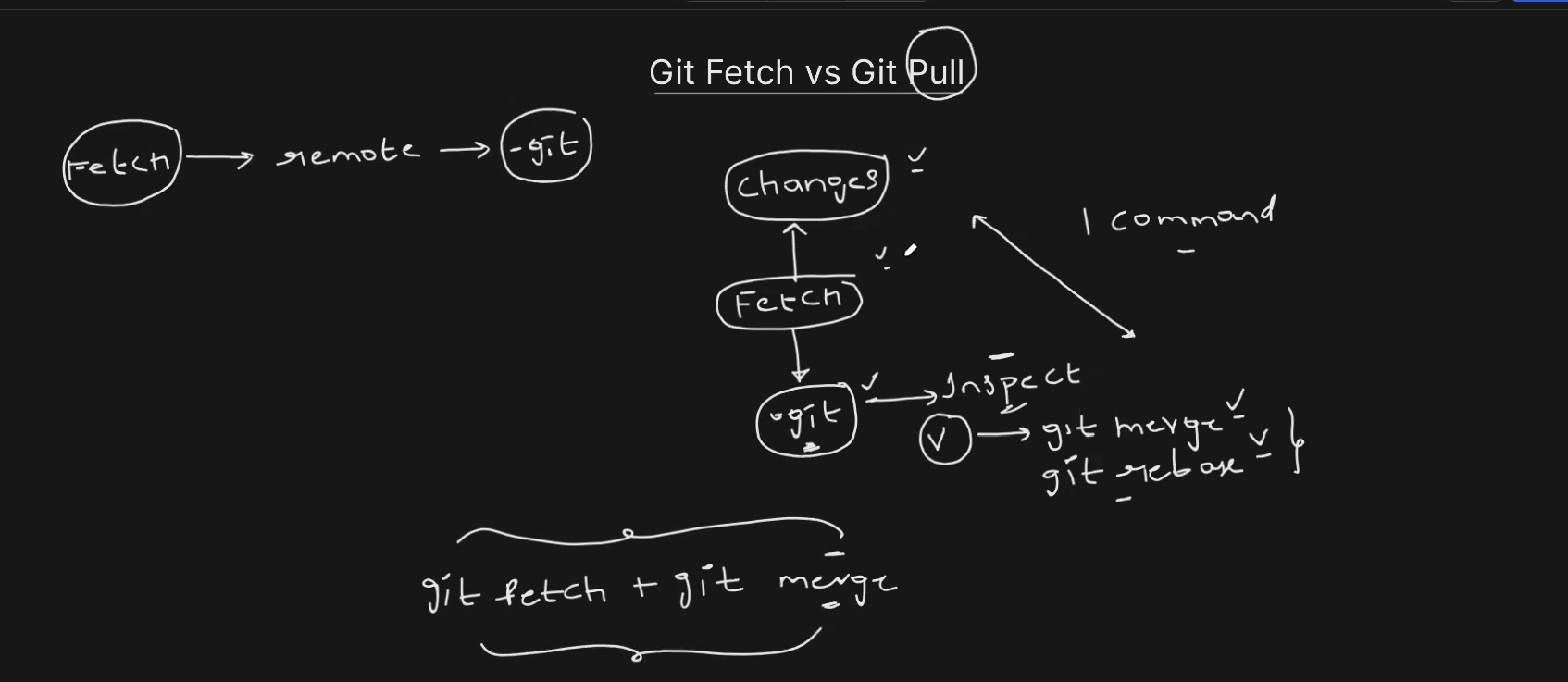
git fetchandgit pull, and when would you use each?
📝 Short explanation
This question checks your understanding of how Git handles remote updates. Many developers use git pull out of habit without realizing it combines two actions—actions that git fetch keeps separate for greater control.
✅ Answer
git fetchretrieves the latest changes from the remote repository without merging them into your current branch.git pulldoes the same asfetchbut also automatically merges the changes into your current branch.
📘 Detailed explanation
When you run git fetch, you’re asking Git to contact the remote (like GitHub) and download any changes (new commits, branches, tags) — without applying them to your working directory.
plaingit fetch origin
This is useful when you:
- want to see what others have pushed
- are preparing for a manual merge or rebase
- want to avoid surprise changes to your working branch
With git pull, you do this and merge the changes into your current branch in a single step:
plaingit pull origin main
That’s shorthand for:
plaingit fetch origin git merge origin/main
While git pull is faster, it can lead to unintended merges if you’re not ready. That’s why many teams prefer running fetch first, reviewing the changes, and then merging or rebasing manually.
Summary:
Use
git fetchwhen you want more control.Use
git pullwhen you’re ready to sync changes right away.
- What is the difference between
git forkandgit clone, and when would you use each?
git forkcreates a copy of a repository on your GitHub (or GitLab, etc.) account, letting you propose changes without write access to the original repo.git clonecreates a local copy of any Git repository (your own or someone else’s) on your machine for development.
This is especially useful for contributing to open-source and team projects where you don't have direct write access to the main repository. You fork the repo, make changes in your fork, and then create a pull request to propose those changes to the original project.
On the other hand, git clone is used to download a repository (forked or original) to your local development machine. This is what actually gives you the codebase to work with.
- What is the difference between
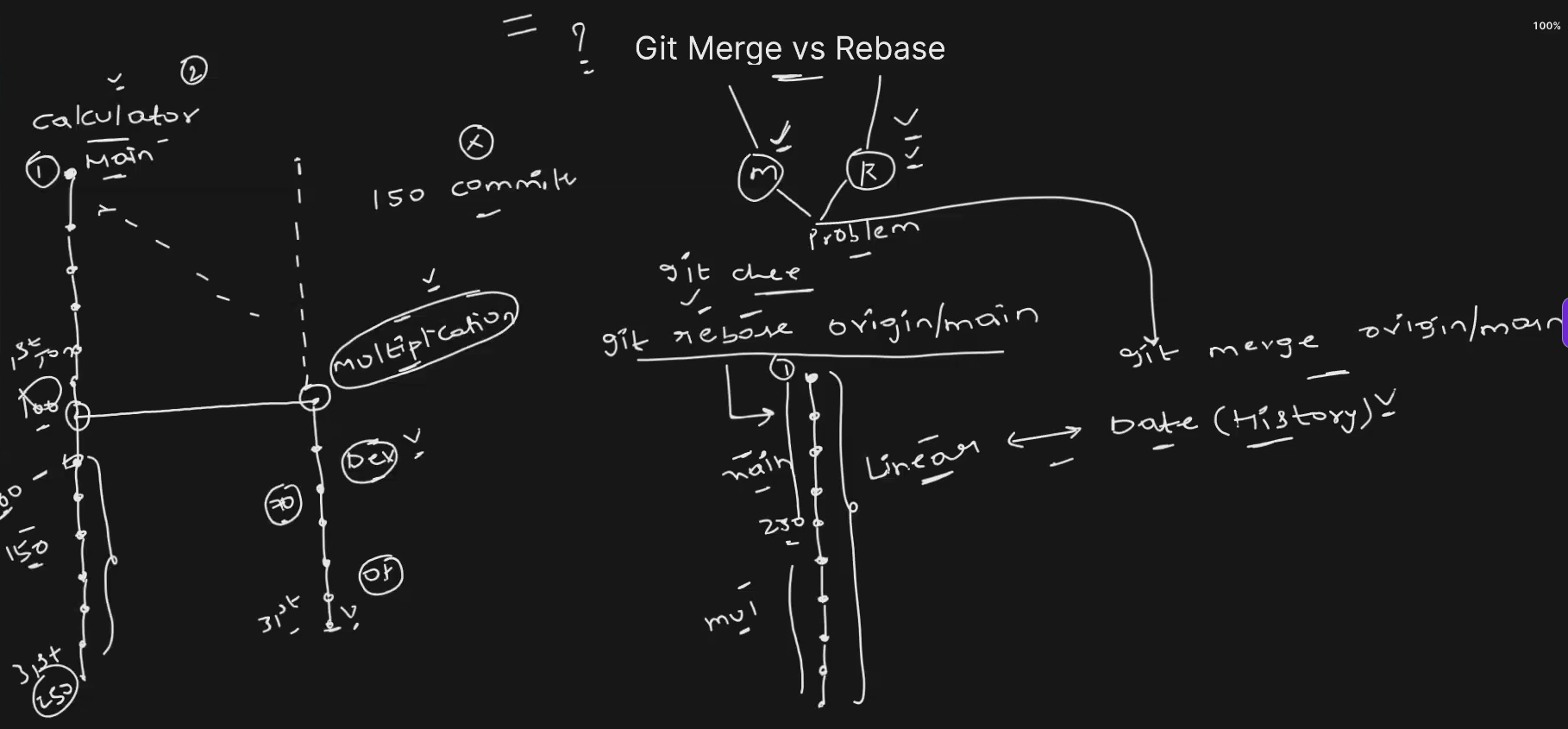
git rebaseandgit merge? When would you use each?
-
git mergeintegrates changes by creating a new merge commit, preserving the history of both branches. -
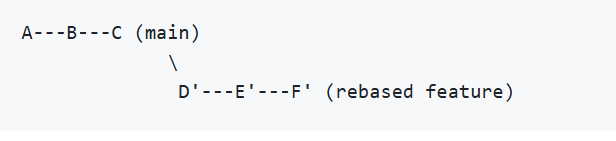
git rebasemoves your branch on top of another, rewriting commit history to create a linear sequence.This **re-applies your commits on top of the latest** **`main`**, like this:
Use merge when... | Use rebase when... |
|---|---|
| You're collaborating on shared branches | You're working alone or before a PR merge |
| You want to preserve commit context | You want a clean, linear history |
| History safety is a concern | You're cleaning up before pushing |
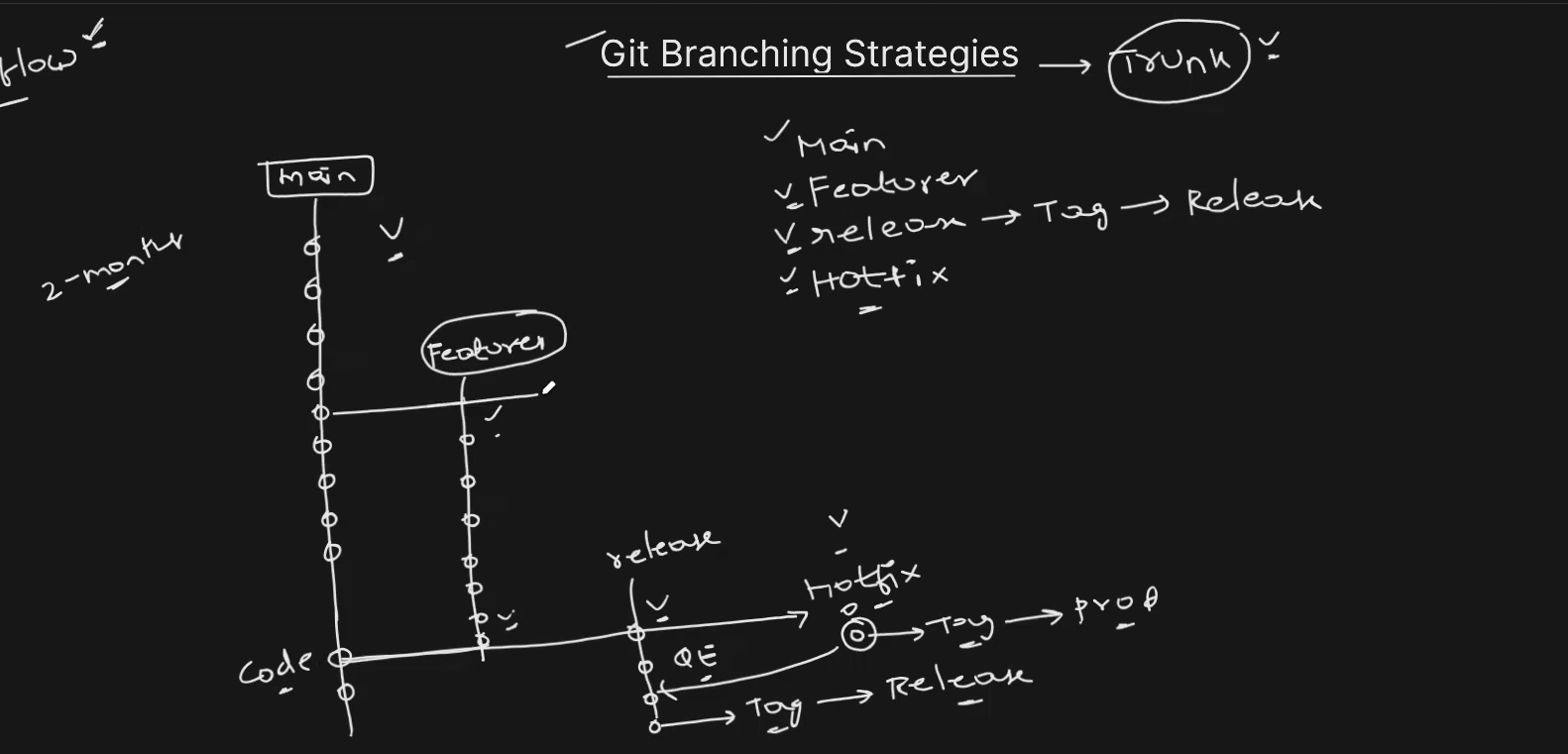
- Explain the Git branching strategy you used in your company. Align it with the open-source branching strategy followed by Kubernetes.
In my company, we followed a well-structured Git branching model similar to the Kubernetes project's workflow. Our strategy centered around four key branches:
main– the default and stable development branchfeature/*– for all new features and enhancementsrelease/*– for preparing and testing production releaseshotfix/*– for urgent bug fixes or patches to production
This helped us maintain stability while enabling parallel development and quick recovery from issues
RESOURCE TO REVISE - Interview Guides - Your Interview Questions Answered
Github Repo for all the devops scenerio based questions :
AWS Interview guide -
Course-Presentation-AWS-INTERVIEW-GUIDE.pdf
Some docker common commands
- docker pull
- docker run
- docker ps
- docker ps -a
- docker stop
- docker rm
- docker images
- docker rmi
- docker run -d <image_name> = this runs the image in detach mode, it means my terminal become free and the running task is executed in the bg.
- docker exec -it <container_id> /bin/bash —> is used to start an interactive Bash shell session inside a running Docker container. Here's a breakdown:
docker exec: Executes a command in a running container.it: Combinesi(interactive) andt(pseudo-TTY) so you can interact with the shell.- <container_id>: Replace this with the actual container ID or name.
/bin/bash: The command to run inside the container — in this case, Bash.
Example: docker exec -it my_container /bin/bash
—> This opens a shell inside my_container, letting you run commands as if you were inside a regular Linux terminal.
- To delete all Docker images from your host — including those in use by containers —
STEPS: 1. Stop and remove all containers (since images can't be deleted if containers are using them): docker stop (docker ps -a -q)
1. Remove all images: docker rmi $(docker images -q)
What these commands do:
docker ps -q: lists running container IDs.docker ps -a -q: lists all container IDs.docker images -q: lists all image IDs.docker stopanddocker rm: stop and remove all containers.docker rmi: removes all images.
- docker inspect
- docker logs
Docker Images
A docker image is a lightweight, standalone and executable package that includes everything needed to run a piece of software, including the code, runtime, libraries, environment variables, and configuration files.
- Docker images are built layer by layer. It is not like a bundled packages.
- Images are immutable.
- Also Portable.
Docker Containers
A container is a runtime instance of a docker image. It is a lightweight, standalone, and executable package that includes everything needed to run a piece of software.
- Containers works in isolation
- Two containers are separated although they derived from the same image.
Kubernetes(k8s)-
What it is:
Kubernetes is an intelligent way of running containers workloads at scale.
Kubernetes we can say is the operating system of the cloud. Kubernetes is a bunch of VMs, who are able to communicate properly with each other and to divide their workloads.
What is namespaces in kubernetes -
a namespace is a way to logically divide a cluster into multiple virtual sub-clusters, so that resources can be grouped, isolated, and managed separately.
Isolation of resources: Namespaces provide a mechanism to isolate groups of resources within a single cluster. This is useful when multiple teams or projects share the same cluster.
Commands:
kubectl config current-context = This command tells you which cluster, user, and namespace are active right now.
kubectl config get-contexts kubectl config use-context my-cluster kubectl config current-context
kubectl run nginx —image=nginx —dry-run=client -o yaml
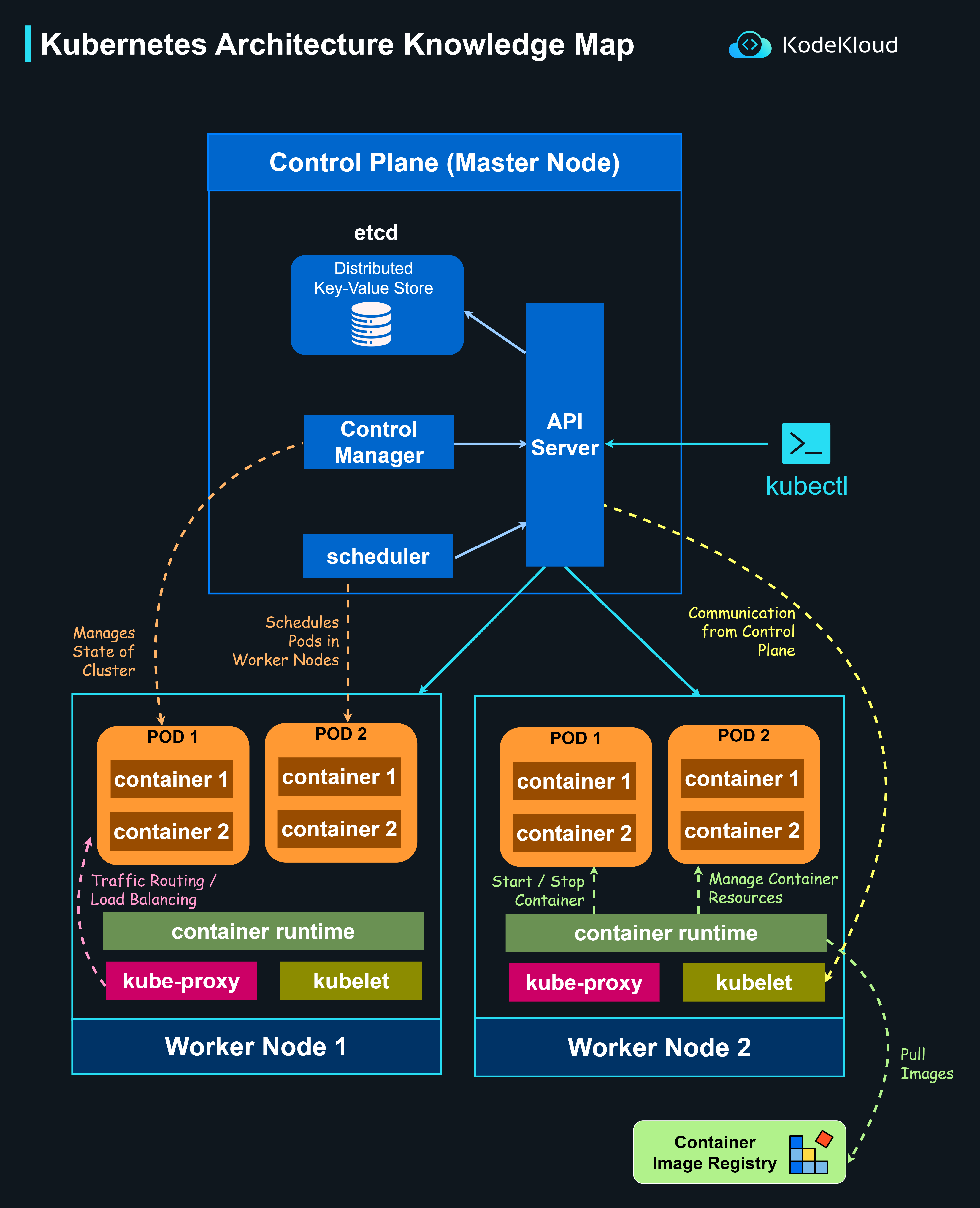
Kubernetes Architecture -
Commands-
ReplicaController-
kubectl create -f rc-definition.yml
kubectl get relicationcontroller
kubectl get pods
ReplicaSet
kubectl create -f replicaset-definition.yml
kubectl get replicaset
kubectl get pods
kubectl delete replicaset myapp-replicaset
kubectl replace -f replicaset-definition.yml
kubectl scale -replicas=6 -f replicaset-definition.yml
kubectl describe replicaset myapp-replicaset
kubectl edit replicaset myapp-replicaset =
Running kubectl edit replicaset myapp-replicaset opens the ReplicaSet manifest in your default editor (usually vi or nano), allowing you to make live changes to the configuration.
kubectl scale replicaset myapp-replicaset —replicas=2
Deployments- It is higher in the heirerchy, it is same as replica set only difference is that it creates a deployment object.
kubectl create -f deployment-definition.yml
kubectl get deployments
kubectl get replicaset
kubectl get pods
kubectl get all
Rollout
kubectl create -f deployment-definition.yml
kubectl get deployments
kubectl apply -f deployment-definition.yml
→ A new rollout is triggered and a new revision of the deployment is created.
kubectl set image deployment/myapp-deployment nginx=nginx:1.9.1
—> updating the image in the definition file using the cmd.
kubectl rollout status deployment/myapp-deployment
kubectl rollout history deployment/myapp-deployment
Note- Rolling update is the default deployment strategy.
kubectl rollout undo deployment/myapp-deployment
—> The deployment will then destroy the pods in the new replica set, and bring the older ones up in the old replica set, and your application is back to its older format.
Services in Kubernetes -
In Kubernetes (K8s), a Service is an abstraction that defines a stable way to access a set of Pods. Since Pods are ephemeral (they can be created, destroyed, or rescheduled), Services provide stable networking and service discovery.
Why Services Are Needed in Kubernetes
- Pods have dynamic IP addresses
- Pods can be recreated or scaled
- Directly connecting to Pods is unreliable
✅ Service solves this by:
- Providing a stable IP & DNS name
- Load-balancing traffic across Pods
- Enabling communication inside and outside the cluster
Service-NodePort
service-definition.yml
apiVersion: v1
kind: Service
metadata:
name: myapp-service
spec:
   type: NodePort


   ports:


        - targetPort: 80


           port: 80


           nodePort: 30008


    selector:


            app: myapp


            type: front-end
kubectl create -f service-definition.yml
kubectl get services
Service-ClusterIP
service-definition.yml
apiVersion: v1
kind: Service
metadata:
name: back-end
spec:
    type: ClusterIP


    ports:


         - targetPort: 80


            port: 80


     selector:


             app: myapp


             type: back-end
kubectl create -f service-definition.yml
kubectl get services
Service- LoadBalancer
service-definition.yml
apiVersion: v1
kind: Service
metadata:
name: myapp-service
spec:
  type: LoadBalancer


  ports:


      - targetPort: 80


         port: 80


         nodePort: 30008
minikube service vote —>
-
It looks up the
voteservice in your Kubernetes cluster. -
It identifies the NodePort assigned to it (in your case,
30811).- It launches your default web browser and opens the service at a URL like:
This gives you direct access to the
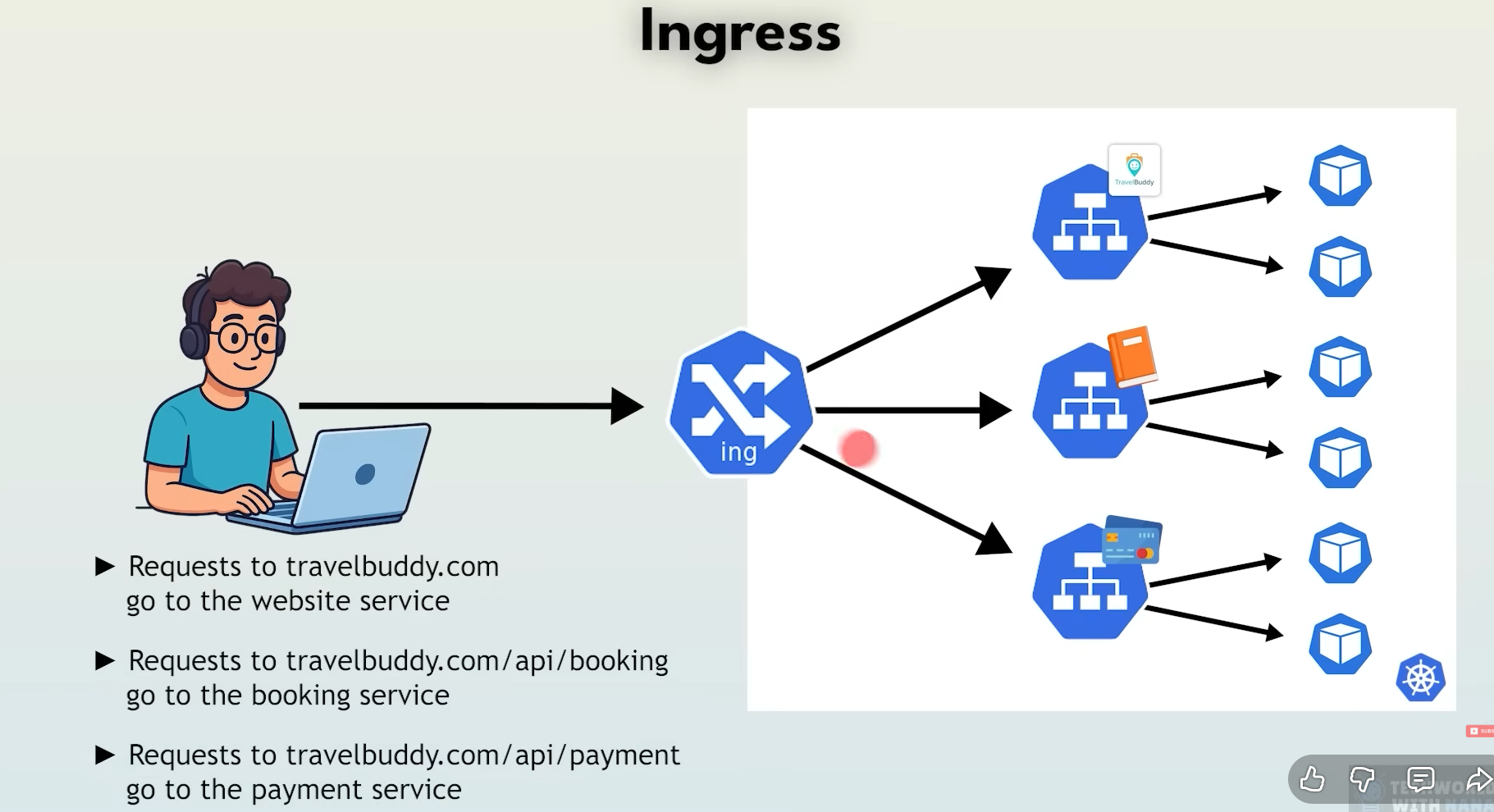
voteinterface running inside your cluster.Ingress
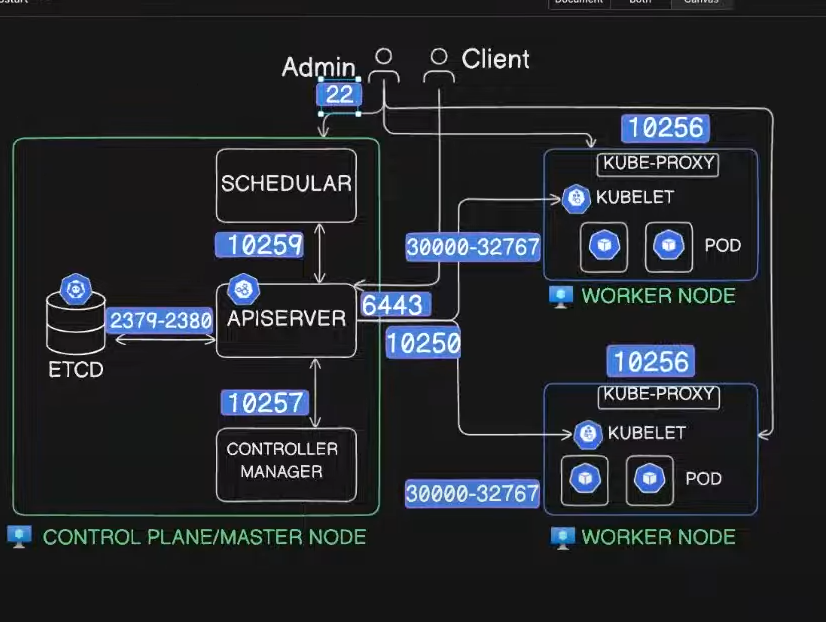
Kubeadm -
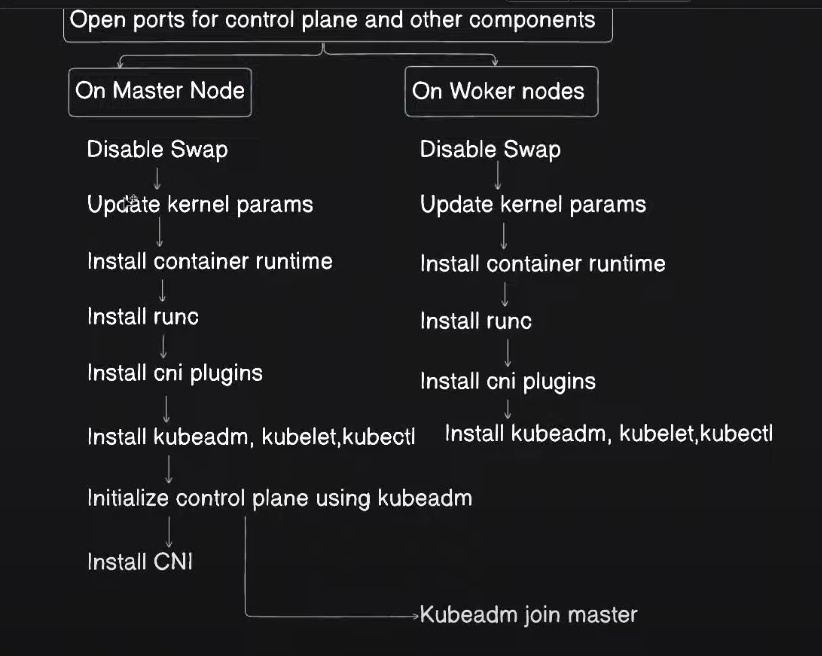
Setup a multi node k8s cluster using kubeadm
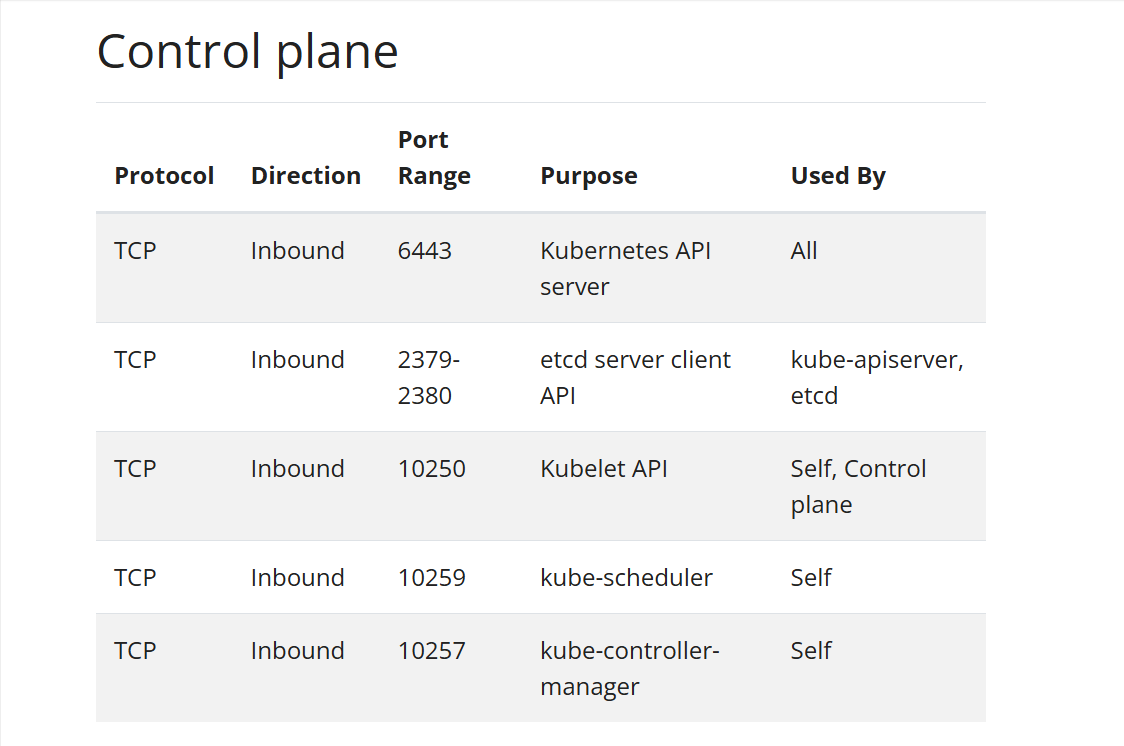
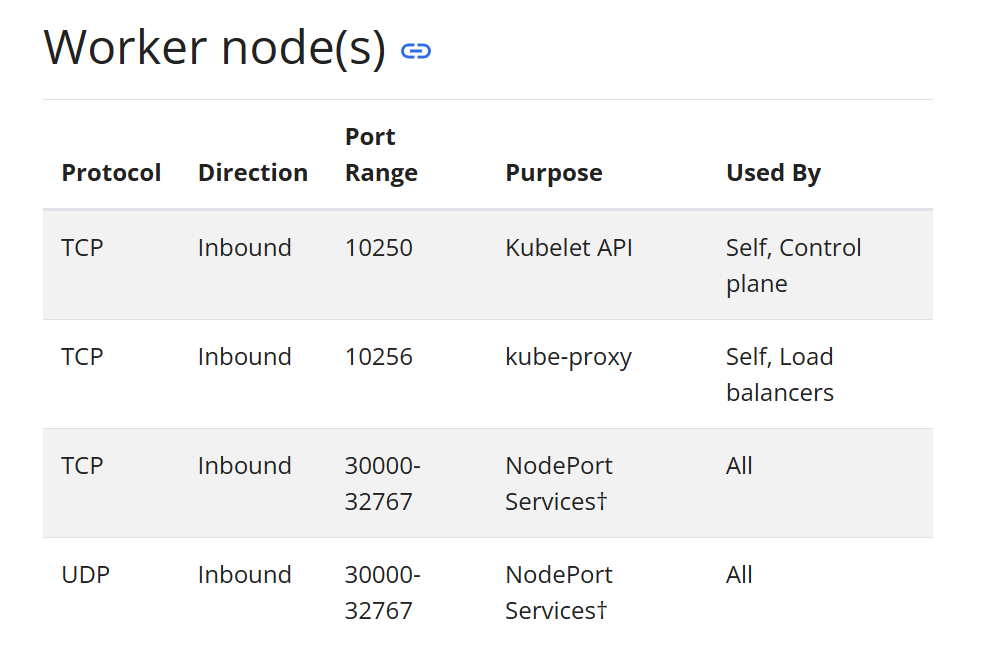
Ports—>
karan user -
access key - AKIAUM2PQ25SFSXPH2O5
secret access key - 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
AWS EKS Kubernetes
Helm Chart -
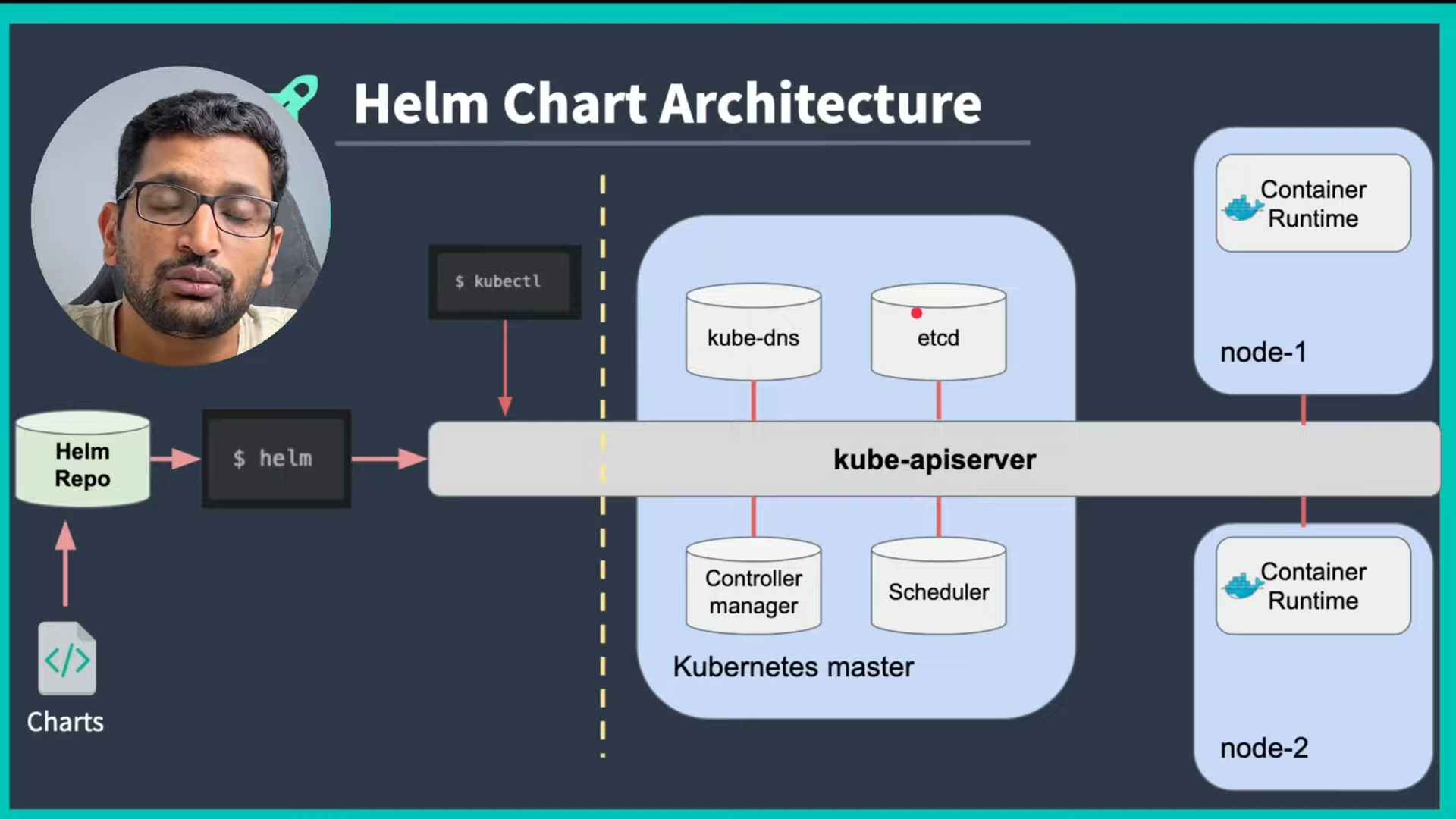
Helm CLI (Commands) -
helm create helloworld
helm install myhelloworldrelease helloworld
helm delete myhelloworldrelease
helm list -a
helm uninstall myhelloworldrelease
helm upgrade myhelloworldrelease helloworld
helm rollback myhelloworldrelease
helm install myhelloworldrelease —debug —dry-run helloworld = This cmd intended to simulate a Helm chart installation without actually deploying anything.
helm template helloworld = validate YAMLs without connecting to k8s api server. Also we can say it renders the chart template locally.
helm lint helloworld = Find any errors or misconfigurations.
hostname -I = use for knowing the ip address for my ubuntu machine
microk8s dashboard-proxy = it opens the k8s dashboard.
Terraform -
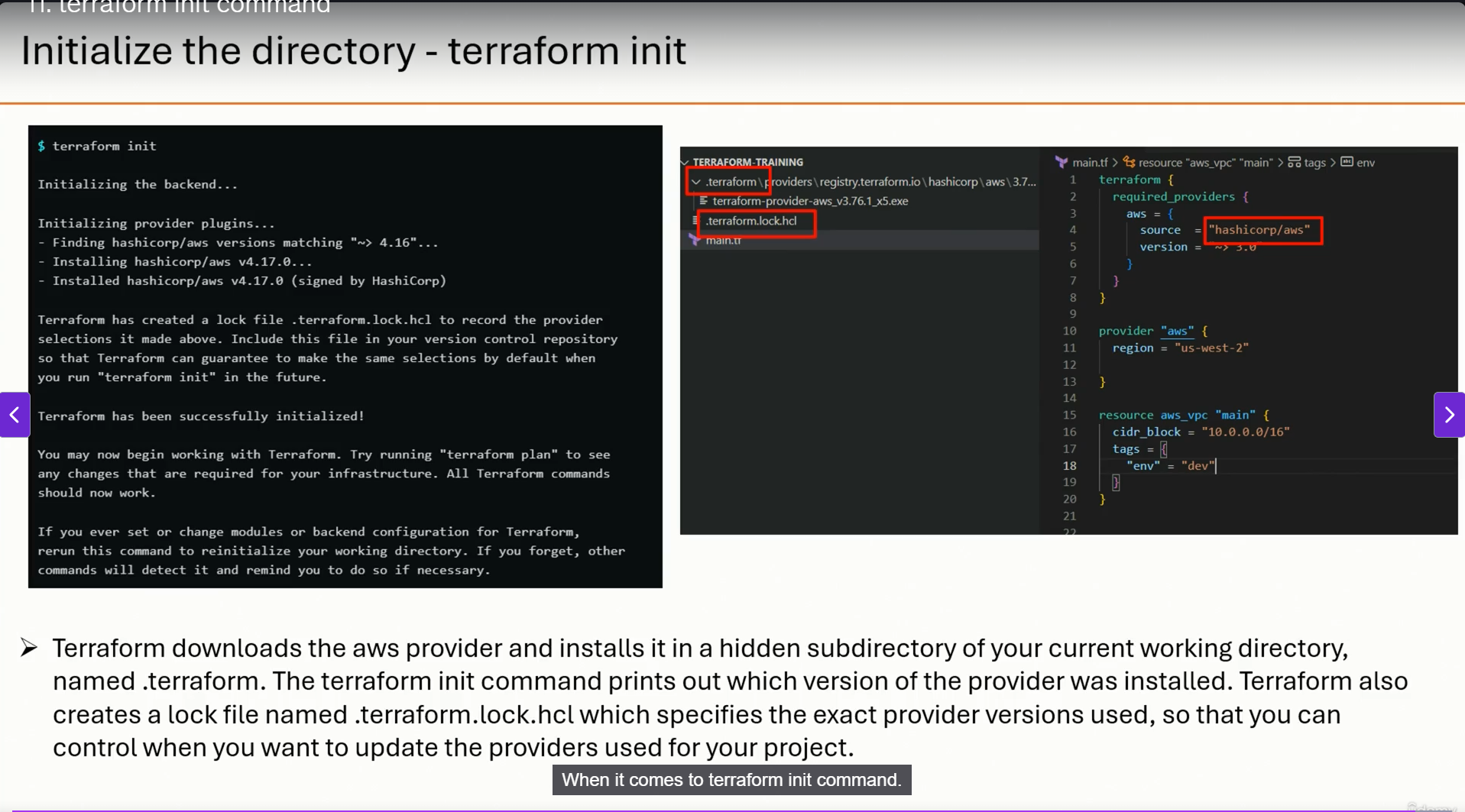
Main mantra for terraform syntax
<arguments>
}
cmd-
terraform init
terraform plan
terraform apply
terraform state list
terraform state show
terraform destroy
terraform destroy —target
Assignments
Question 1. Create a CLI for counting the number of words in a file specified.
javascriptconst { Command } = require('commander');
const fs = require('fs')
const program = new Command();
program
.name('CountWordsCLI')
.description('CLI to counts the number of words inside the file specified')
.version('0.8.0');
program.command('count')
.description('Counting the words in the file')
.argument('<file>', 'file to count')
.action((file) => {
fs.readFile(file,'utf-8',(err,data) => {
if (err){
console.log(err);
}else{
const words = data.trim().split(/\s+/).filter(Boolean);
console.log(`There are ${words.length} words in ${file}`);
}
});
});
program.parse();
Question 2. Create a CLI for doing the CRUD operation in the To-Do List (which is a file).
javascript#!/usr/bin/env node
const { Command } = require('commander');
const fs = require('fs');
const path = require('path');
const program = new Command();
const filePath = path.join(__dirname, 'todos.json');
// Ensure file exists
if (!fs.existsSync(filePath)) {
fs.writeFileSync(filePath, JSON.stringify([]));
}
// Helper: Read todos
function readTodos() {
return JSON.parse(fs.readFileSync(filePath, 'utf-8'));
}
// Helper: Save todos
function saveTodos(todos) {
fs.writeFileSync(filePath, JSON.stringify(todos, null, 2));
}
program
.name('todo-cli')
.description('A CLI for managing a To-Do list')
.version('1.0.0');
// CREATE
program
.command('add')
.description('Add a new to-do item')
.argument('<task>', 'Task description')
.action((task) => {
const todos = readTodos();
todos.push({ id: Date.now(), task, done: false });
saveTodos(todos);
console.log(`✅ Added: "${task}"`);
});
// READ
program
.command('list')
.description('List all to-do items')
.action(() => {
const todos = readTodos();
if (todos.length === 0) {
console.log("📭 No tasks found.");
} else {
todos.forEach((t, i) => {
console.log(`${i + 1}. [${t.done ? '✔' : ' '}] ${t.task} (ID: ${t.id})`);
});
}
});
// UPDATE
program
.command('update')
.description('Update a to-do item')
.argument('<id>', 'Task ID')
.argument('<newTask>', 'Updated task description')
.action((id, newTask) => {
const todos = readTodos();
const index = todos.findIndex(t => t.id == id);
if (index === -1) {
console.log(`❌ Task with ID ${id} not found.`);
return;
}
todos[index].task = newTask;
saveTodos(todos);
console.log(`✏ Updated task ID ${id} to "${newTask}"`);
});
// DELETE
program
.command('delete')
.description('Delete a to-do item')
.argument('<id>', 'Task ID')
.action((id) => {
let todos = readTodos();
const initialLength = todos.length;
todos = todos.filter(t => t.id != id);
if (todos.length === initialLength) {
console.log(`❌ Task with ID ${id} not found.`);
return;
}
saveTodos(todos);
console.log(`🗑 Deleted task with ID ${id}`);
});
// MARK AS DONE
program
.command('done')
.description('Mark a to-do item as done')
.argument('<id>', 'Task ID')
.action((id) => {
const todos = readTodos();
const task = todos.find(t => t.id == id);
if (!task) {
console.log(`❌ Task with ID ${id} not found.`);
return;
}
task.done = true;
saveTodos(todos);
console.log(`✔ Task ID ${id} marked as done.`);
});
program.parse();
Middlewares
Question 1 - RequestCount
You have been given an express server which has a few endpoints. Your task is to create a global middleware (app.use) which will maintain a count of the number of requests made to the server in the global requestCount variable.
javascriptconst express = require('express');
const app = express();
let requestCount = 0;
app.use(function(req, res, next){
requestCount = requestCount + 1;
next();
})
app.get('/user', function(req,res){
res.status(200).json({ name : 'john'})
});
app.post('/user', function(req,res){
res.status(200).json({ msg : 'created dummy user' });
});
app.get('/requestCount', function(req, res){
res.status(200).json({ requestCount });
})
app.listen(3000);
Question 2 - Rate-limitter
You have been given an express server which has a few endpoints. Your task is to create a global middleware (app.use) which will rate limit the requests from a user to only 5 request per second
If a user sends more than 5 requests in a single secound, the server should block them with a 404. User will be sending in their user id in the header as 'user-id'. You have been given a number0fRequestForUser object to start off with which clears every one second.
javascriptconst express = require('express');
//const { use } = require('react');
const app = express();
let number0fRequestForUser = {};
setInterval(() => {
number0fRequestForUser = {};
}, 1000)
app.use(function(req, res, next){
const userId = req.headers["user-id"];
if(number0fRequestForUser[userId]){
number0fRequestForUser[userId] = number0fRequestForUser[userId] + 1;
if(number0fRequestForUser[userId] > 5){
res.status(404).send("no entry");
} else{
next();
}
} else {
number0fRequestForUser[userId] = 1;
next();
}
});
app.get("/", (req, res) => {
res.send("Welcome! Your request is allowed.");
});
app.listen(3000);
Question 3 - ErrorCount
You have been given an express server which has a few endpoints.
Your task is to
Ensure that if there is ever an exception, the end user sees a status code of 404
Maintain the errorCount variable whose value should go up every time there is an
exception in any endpoint.
javascriptconst express = require('express')
const app = express();
let errorCount = 0;
app.get('/user', function(req, res){
throw new Error("User not found");
res.status(200).json({ name : 'john'});
})
app.post('/user', function(req, res){
res.status(200).json({ msg: 'created dummy user'});
});
app.get('/errorCount', function(req, res){
res.status(200).json({ errorCount});
});
// error handling middleware
app.use(function(err, req, res, next ){
res.status(404).send({})
errorCount = errorCount + 1;
})
app.listen(3000);
module.exports = app;
Question - 4
Calculator with http server.
javascriptconst express = require('express');
const app = express();
app.get("/sum/:a/:b",function(req,res){
const a = parseInt(req.params.a)
const b = parseInt(req.params.b)
res.json({
answer: a+b
})
});
app.get("/multiply/:a/:b",function(req,res){
const a = parseInt(req.params.a)
const b = parseInt(req.params.b)
res.json({
answer: a*b
})
});
app.get("/divide/:a/:b",function(req,res){
const a = parseInt(req.params.a)
const b = parseInt(req.params.b)
res.json({
answer: a/b
})
});
app.get("/subtract/:a/:b",function(req,res){
const a = parseInt(req.params.a)
const b = parseInt(req.params.b)
res.json({
answer: a-b
})
});
app.listen(3000)
Question 5 - Create a middleware function that logs each incoming request’s HTTP method, URL, and timestamp to the console.
javascript//Create a middleware function that logs each incoming request’s HTTP method, URL, and timestamp to the console.
const express = require('express');
const app = express();
function logger(req, res, next){
console.log("Method is " + req.method)
console.log("Url is " + req.hostname)
console.log(new Date());
next()
}
app.use(logger)
app.get("/sum/:a/:b",function(req,res){
const a = parseInt(req.params.a)
const b = parseInt(req.params.b)
res.json({
answer: a+b
})
});
app.get("/multiply/:a/:b",function(req,res){
const a = parseInt(req.params.a)
const b = parseInt(req.params.b)
res.json({
answer: a*b
})
});
app.get("/divide/:a/:b",function(req,res){
const a = parseInt(req.params.a)
const b = parseInt(req.params.b)
res.json({
answer: a/b
})
});
app.get("/subtract/:a/:b",function(req,res){
const a = parseInt(req.params.a)
const b = parseInt(req.params.b)
res.json({
answer: a-b
})
});
app.listen(3000)
Authentication
Question 1 - Authentication with token logic written by me.
javascriptconst express = require('express')
const app = express()
app.use(express.json());
const users = [];
function generateToken(){
let options = ['a', 'b', 'c', 'd', 'e', 'f', 'g', 'h', 'i', 'j', 'k', 'l', 'm', 'n', 'o', 'p', 'q', 'r', 's', 't', 'u', 'v', 'w', 'x', 'y', 'z', 'A', 'B', 'C', 'D', 'E', 'F', 'G', 'H', 'I', 'J', 'K', 'L', 'M', 'N', 'O', 'P', 'Q', 'R', 'S', 'T', 'U', 'V', 'W', 'X', 'Y', 'Z', '0', '1', '2', '3', '4', '5', '6', '7', '8', '9'];
let token = "";
for(let i = 0; i < 32; i++){
token += options[Math.floor(Math.random() * options.length)];
}
return token;
}
app.post("/signup", function(req, res){
const username = req.body.username;
const password = req.body.password;
users.push({
username: username,
password: password
})
res.json({
message: "You are signed up"
})
})
app.post("/signin", function(req, res){
const username = req.body.username;
const password = req.body.password;
let foundUser = null;
for(let i = 0; i < users.length; i++){
if(users[i].username === username && users[i].password === password){
foundUser = users[i];
break;
}
}
if(foundUser){
const token = generateToken();
foundUser.token = token;
res.json({
message: "You are signed in",
token: token
})
} else{
res.status(403).send({
message: "Invalid username or password"
})
}
})
app.get("/me", function(req,res){
const token = req.headers.token;
let foundUser = null;
for(let i=0; i<users.length; i++){
if(users[i].token == token){
foundUser = users[i]
}
}
if(foundUser){
res.json({
username: foundUser.username,
password: foundUser.password
})
}else{
res.json({
message: "token invalid"
})
}
})
app.listen(3000);
Question 2 - Replace token logic with the JWT(Json web tokens)
javascriptconst express = require('express')
const app = express();
const jwt = require('jsonwebtoken');
//const { use } = require('react');
const JWT_SECRET = "karanilovekaran"
app.use(express.json())
const users = []
app.post("/signup", function(req, res){
const username = req.body.username;
const password = req.body.password;
users.push({
username: username,
password: password
})
res.json({
message: "You are signed up"
})
})
app.post("/signin", function(req, res){
const username = req.body.username;
const password = req.body.password;
let foundUser = null;
for(let i = 0; i < users.length; i++){
if(users[i].username === username && users[i].password === password){
foundUser = users[i];
break;
}
}
if(foundUser){
const token = jwt.sign({
username : username
}, JWT_SECRET); // convert their username over to a jwt
//foundUser.token = token;
res.json({
message: "You are signed in",
token: token
})
} else{
res.status(403).send({
message: "Invalid username or password"
})
}
})
app.get("/me", function(req,res){
const token = req.headers.token;
const decodedInformation = jwt.verify(token, JWT_SECRET)
const username = decodedInformation.username
let foundUser = null;
for(let i=0; i<users.length; i++){
if(users[i].username == token){
foundUser = users[i]
}
}
if(foundUser){
res.json({
username: foundUser.username,
password: foundUser.password
})
}else{
res.json({
message: "token invalid"
})
}
})
app.listen(3000);
Question - 3 Create a middleware called auth that verifies if a user is logged in and ends the request early if the user is not logged in. Also add the frontend for signup signin and logout.
javascript// Create a middleware called auth that verifies if a user is logged in and ends the request early if the user is not logged in.
const express = require('express')
const app = express();
const jwt = require('jsonwebtoken');
const JWT_SECRET = "ilovekaran"
app.use(express.json())
const users = [];
function logger(req, res, next){
console.log(req.method + " request came")
next();
}
app.get("/", function(req,res){
res.sendFile(__dirname + "/public/index.html")
})
app.post("/signup", logger,function(req, res){
const username = req.body.username;
const password = req.body.password;
users.push({
username: username,
password: password
})
res.json({
message: "You are signed up"
})
})
app.post("/signin", logger, function(req, res) {
const username = req.body.username;
const password = req.body.password;
let foundUser = null;
for (let i = 0; i < users.length; i++) {
if (users[i].username === username && users[i].password === password) {
foundUser = users[i]
}
}
if (!foundUser) {
res.json({
message: "Credentials incorrect"
})
return
} else {
const token = jwt.sign({
username: foundUser.username
}, JWT_SECRET);
res.header("jwt", token)
res.json({
token: token
})
}
})
function auth(req, res, next){
const token = req.headers.token
const decodedData = jwt.verify(token, JWT_SECRET);
if(decodedData.username){
req.username = decodedData.username
next()
}else{
res.json({
message: "You are not logged in"
})
}
}
app.get("/me", auth, logger, function(req,res){
let foundUser = null;
for(let i =0; i<users.length; i++){
if(users[i].username === req.username){
foundUser = users[i];
}
}
res.json({
username: foundUser.username,
password : foundUser.password
})
})
app.listen(3000)
html<!DOCTYPE html>
<html lang="en">
<head>
<meta charset="UTF-8">
<meta name="viewport" content="width=device-width, initial-scale=1.0">
<title>Auth Website</title>
<script src="https://cdnjs.cloudflare.com/ajax/libs/axios/1.7.7/axios.min.js"></script>
<script>
async function signup(){
const username = document.getElementById("signup-username").value;
const password = document.getElementById("signup-password").value;
await axios.post("http://localhost:3000/signup",{
username: username,
password: password
})
alert("You are signed up")
}
async function signin(){
const username = document.getElementById("signin-username").value;
const password = document.getElementById("signin-password").value;
const response = await axios.post("http://localhost:3000/signin",{
username: username,
password: password
})
localStorage.setItem("token", response.data.token)
alert("You are signed in")
}
async function getUserInformation(){
const response = await axios.get("http://localhost:3000/me",{
headers: {
token: localStorage.getItem("token")
}
})
document.getElementById("information").innerHTML = "Username: " + response.data.username + " Password: " + response.data.password;
}
getUserInformation();
function logout(){
localStorage.removeItem("token");
}
</script>
</head>
<body>
<div>
SignUp
<input id="signup-username" type = "text" name = "username" placeholder="username">
<input id="signup-password" type = "password" name = "password" placeholder="Password">
<button onclick="signup()">Submit</button>
</div>
<div>
SignIn
<input id="signin-username" type = "text" name = "username" placeholder="username">
<input id="signin-password" type = "password" name = "password" placeholder="Password">
<button onclick="signin()">Submit</button>
</div>
<div>
UserInformation:
<div id="information"></div>
</div>
<div>
<button onclick="logout()">Logout</button>
</div>
</body>
</html>
Database-
Todo application with jwt authentication-
DB.js
javascriptconst mongoose = require("mongoose")
const Schema = mongoose.Schema
const ObjectId = mongoose.ObjectId;
const User = new Schema({
email: {type: String, unique: true},
password: String,
name: String
})
const Todo = new Schema({
title: String,
done: Boolean,
userId: ObjectId
})
const UserModel = mongoose.model('users', User)
const TodoModel = mongoose.model('todos', Todo)
module.exports= {
UserModel: UserModel,
TodoModel: TodoModel
}
index.js
javascriptconst express = require('express')
const { UserModel, TodoModel } = require("./db");
const jwt = require("jsonwebtoken");
const { default: mongoose } = require('mongoose');
const JWT_SECRET = "asdadslsg@123"
mongoose.connect("mongodb+srv://titkaran09_db_user:WCFZpLejg1DhPUpN@cluster01.qc0er3j.mongodb.net/Todos")
const app = express()
app.use(express.json());
app.post("/signup", async function(req, res){
const email = req.body.email;
const password = req.body.password;
const name = req.body.name;
await UserModel.create({
email: email,
password: password,
name: name
})
res.json({
message: "You are logged in"
})
});
app.post("/signin",async function(req, res){
const email = req.body.email;
const password = req.body.password;
const user = await UserModel.findOne({
email: email,
password: password
})
console.log(user)
if(user){
const token = jwt.sign({
id: user._id.toString()
}, JWT_SECRET);
res.json({
token: token
})
} else{
res.status(403).json({
message: "Incorrect credentials"
})
}
});
app.post("/todo", auth, function(req, res){
const userId = req.userId;
const title = req.body.title;
TodoModel.create({
title,
userId
})
res.json({
userId: userId
})
});
app.get("/todos", auth, async function(req, res){
const userId = req.userId;
const todos = await TodoModel.find({
userId: userId
})
res.json({
todos
})
});
function auth(req, res, next){
const token = req.headers.token;
const decodedData = jwt.verify(token, JWT_SECRET);
if(decodedData){
req.userId = decodedData.id;
next();
} else{
res.status(403).json({
message: "Incorrect Credentials"
})
}
}
app.listen(3000);
Todo application with mongodb as a database, jwt for authentication, zod for input validation and bcrypt for hashing the passwords to save to the DB.
index.js
javascriptconst bcrypt = require("bcrypt")
const express = require('express')
const { UserModel, TodoModel } = require("./db");
const jwt = require("jsonwebtoken");
const { default: mongoose } = require('mongoose');
const JWT_SECRET = "asdadslsg@123"
const {z} = require("zod");
mongoose.connect("mongodb+srv://titkaran09_db_user:WCFZpLejg1DhPUpN@cluster01.qc0er3j.mongodb.net/Todos")
const app = express()
app.use(express.json());
app.post("/signup", async function(req, res){
const requireBody = z.object({
email: z.string().min(3).max(50).email(),
name: z.string().min(3).max(50),
password: z.string()
.min(8, "Password must be at least 8 characters long")
.max(30)
.regex(/[A-Z]/, "Password must contain at least one uppercase letter")
.regex(/[a-z]/, "Password must contain at least one lowercase letter")
.regex(/\d/, "Password must contain at least one number")
.regex(/[!@#$%^&*()_+\-=[\]{};':"\\|,.<>/?]/, "Password must contain at least one special character")
})
const parsedDataWithSuccess = requireBody.safeParse(req.body);
if(!parsedDataWithSuccess.success){
res.json({
message: "Incorrect format",
error: parsedDataWithSuccess.error
})
return
}
const email = req.body.email;
const password = req.body.password;
const name = req.body.name;
let errorThrown = false;
try{
const hashedPassword = await bcrypt.hash(password, 5);
console.log(hashedPassword)
await UserModel.create({
email: email,
password: hashedPassword,
name: name
});
} catch(e){
res.json({
message: "User already exists"
})
errorThrown = true;
}
if(!errorThrown){
res.json({
message: "You are signed up"
})
}
});
app.post("/signin", async function (req, res) {
const email = req.body.email;
const password = req.body.password;
const user = await UserModel.findOne({
email: email,
});
if (!user) {
return res.status(403).json({
message: "Invalid Credentials!",
});
}
// Compare the password with the hashed password using the bcrypt.compare() method
const passwordMatch = await bcrypt.compare(password, user.password);
// If the user password matches
if (passwordMatch) {
// Create a JWT token using the jwt.sign() method
const token = jwt.sign({
id: user._id.toString(),
}, JWT_SECRET);
// Send the token to the client
res.json({
token: token,
message: "You are signed in!",
});
} else {
res.status(403).json({
message: "Invalid Credentials!",
});
}
});
app.post("/todo", auth, function(req, res){
const userId = req.userId;
const title = req.body.title;
TodoModel.create({
title,
userId
})
res.json({
userId: userId
})
});
app.get("/todos", auth, async function(req, res){
const userId = req.userId;
const todos = await TodoModel.find({
userId: userId
})
res.json({
todos
})
});
function auth(req, res, next){
const token = req.headers.token;
const decodedData = jwt.verify(token, JWT_SECRET);
if(decodedData){
req.userId = decodedData.id;
next();
} else{
res.status(403).json({
message: "Incorrect Credentials"
})
}
}
app.listen(3000);
db.js
javascriptconst mongoose = require("mongoose")
const Schema = mongoose.Schema
const ObjectId = mongoose.ObjectId;
const User = new Schema({
email: {type: String, unique: true},
password: String,
name: String
})
const Todo = new Schema({
title: String,
done: Boolean,
userId: ObjectId
})
const UserModel = mongoose.model('users', User)
const TodoModel = mongoose.model('todos', Todo)
module.exports= {
UserModel: UserModel,
TodoModel: TodoModel
}