100xDevs Notes
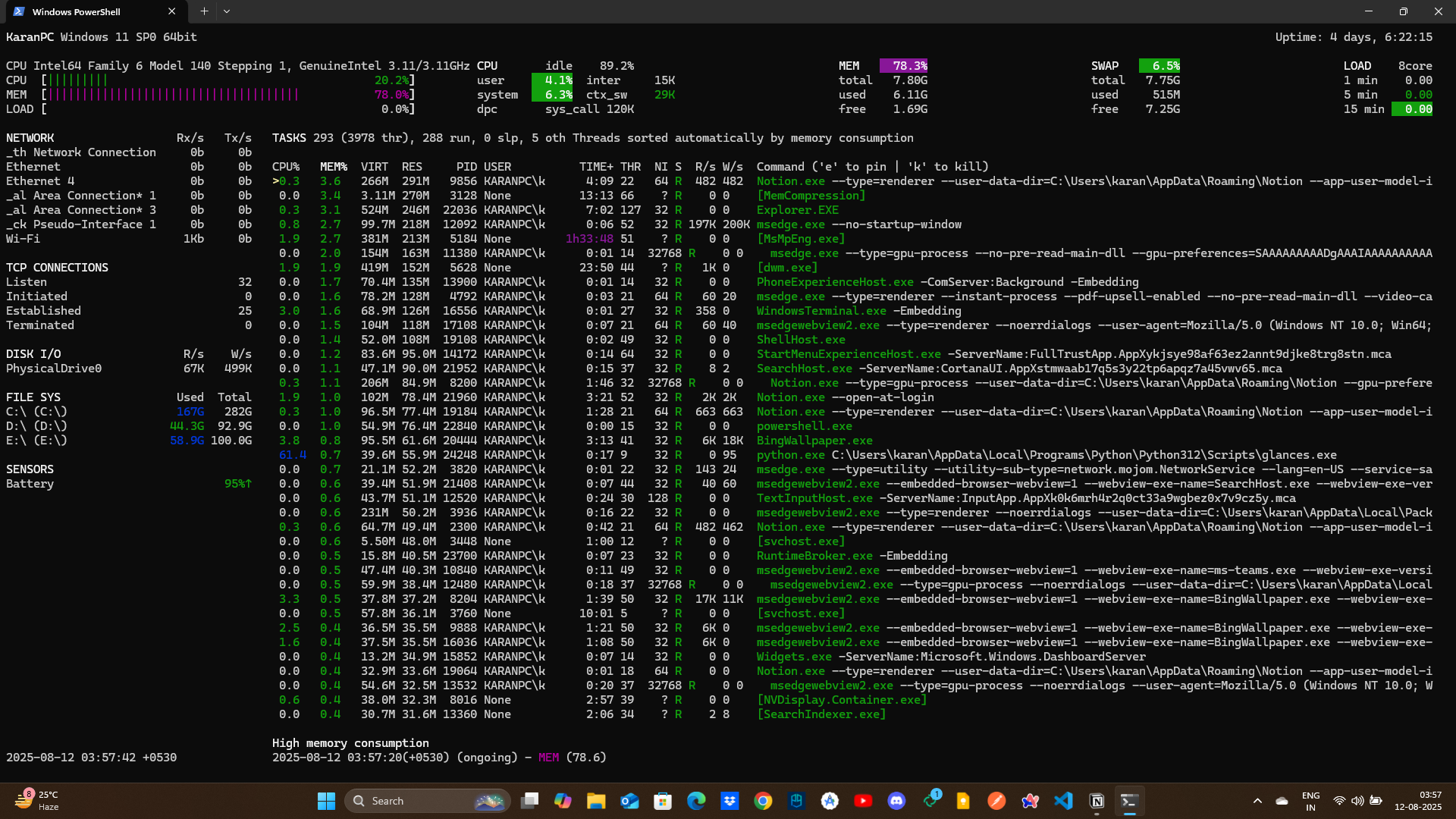
- Glances in the command line for windows for viewing the system resources uses.
- Use
pip install glancesto install Glances on Windows through Python package manager. - Make sure Python and pip are already installed and added to your PATH environment variable.
- After installation, you can run Glances by typing
glancesin the command prompt or PowerShell.
Promises in JS - Promise
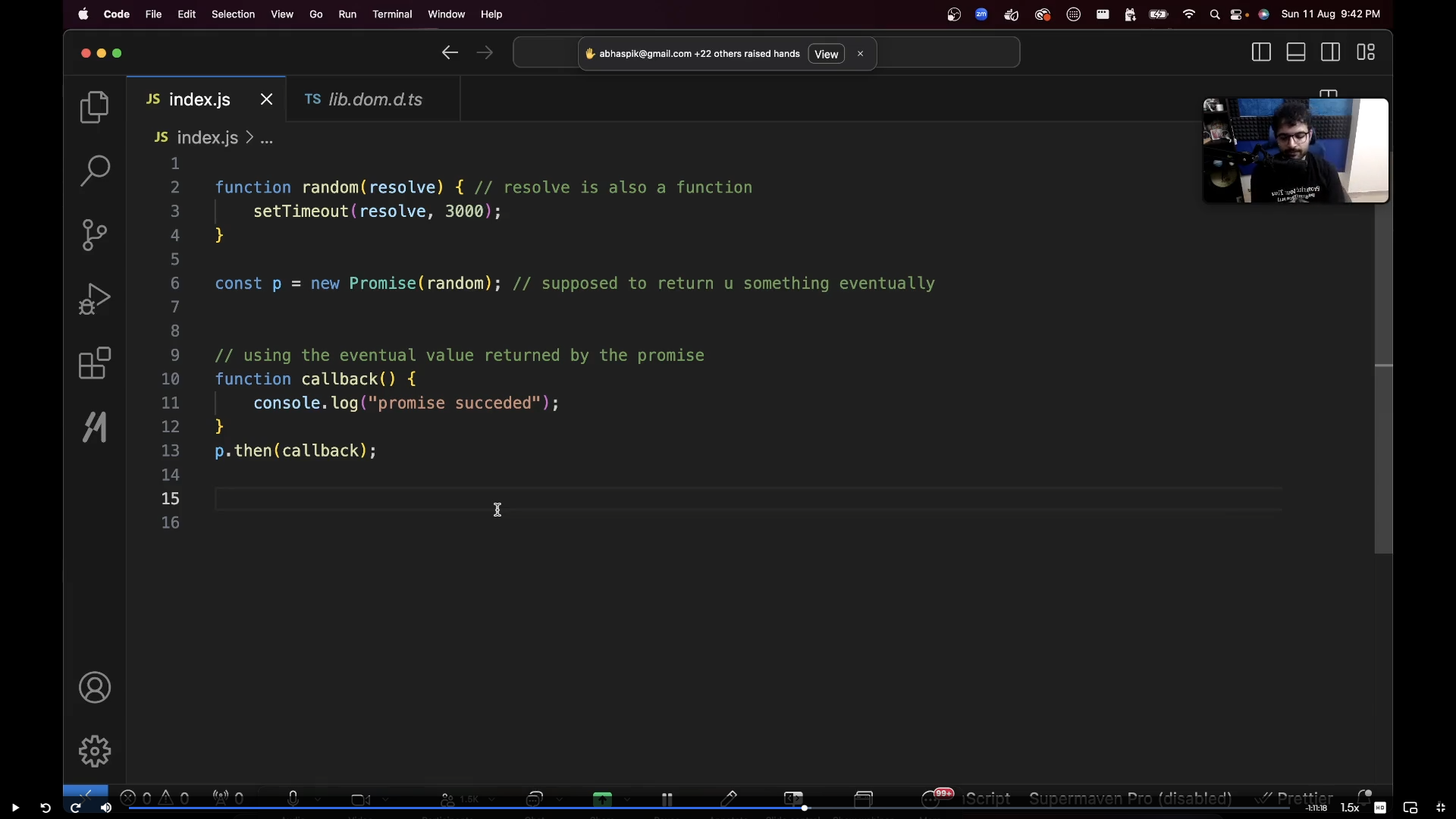
A Promise in JavaScript is an object that represents the eventual completion (or failure) of an asynchronous operation and its resulting value. Promises are used to handle asynchronous operations more effectively than traditional callback functions, providing a cleaner and more manageable way to deal with code that executes asynchronously, such as API calls, file I/O, or timers.
Other way of explaining-
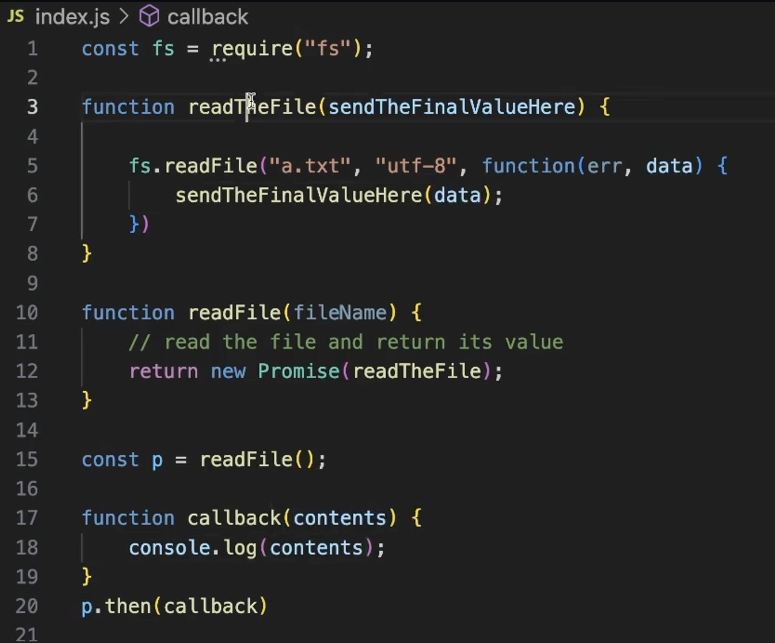
Promise takes function as input whose first argument is also a function which will be called after resolving the promise (.then wala)
DOM Manipulations-
What is DOM?
The DOM, or Document Object Model, is a programming interface for web documents. It represents the structure of a web page as a tree of objects.
javascript<html>
<head>
<title>Simple app</title>
<meta name="description" content="A brief description of the webpage content for search engines and social media.">
</head>
<body>
<h1>
hi there
</h1>
</body>
</html>


Why DOM?
The DOM abstracts the structure of the document into a tree of objects, allowing scripts to manipulate the content and structure dynamically. This abstraction enables more complex interactions and functionalities beyond just static HTML.
Static HTML
As the name suggests, static HTML represents HTML that does not change.
For example -
javascript<!DOCTYPE html>
<html>
<head>
<meta charset="utf-8">
<meta name="viewport" content="width=device-width">
<title>replit</title>
<link href="style.css" rel="stylesheet" type="text/css" />
</head>
<body>
<h1>Todo list</h1>
<h4>1. Take class</h4>
<h4>2. Go out to eat</h4>
<div>
<input type="text"></input>
<button>Add Todo</button>
</div>
<script src="script.js"></script>
</body>
</html>
If you click on the Add Todo button, nothing happens

Middleware -
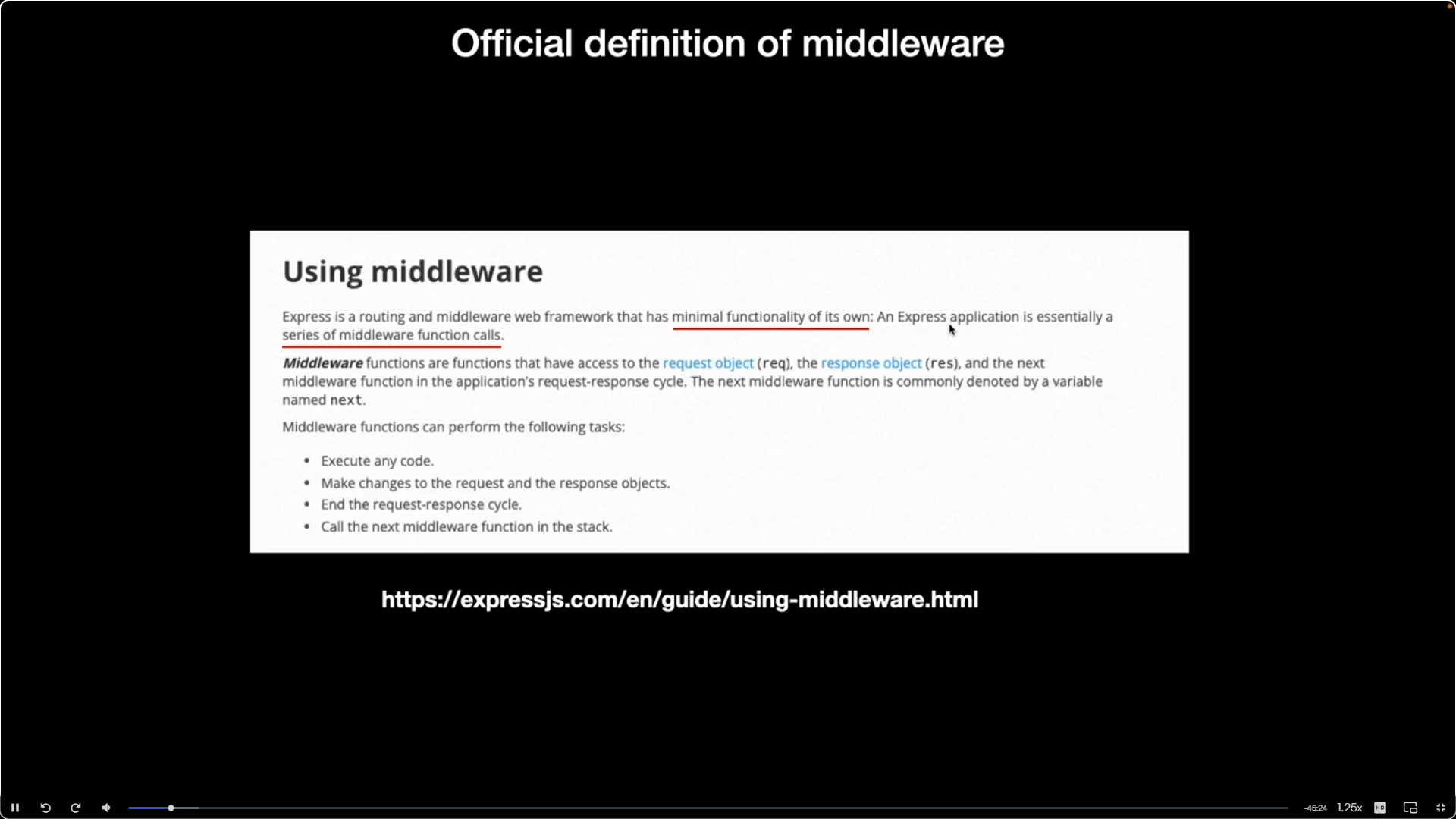
In Express.js, middleware refers to functions that have access to the request object (req), response object (res), and the next function in the application's request-response cycle. Middleware functions can perform a variety of tasks, such as
- Modifying the request or response objects.
- Ending the request-response cycle.
- Calling the next middleware function in the stack.
Example- Logging Middleware
javascriptconst express = require('express');
const app = express();
// custom middleware
app.use((req, res, next) => {
console.log(`Time: ${Date.now()} | ${req.method} ${req.url}`);
next(); // go to the next middleware/route
});
app.get('/', (req, res) => {
res.send('Hello, Middleware!');
});
app.listen(3000, () => console.log('Server running on port 3000'));
Some common external Middleware's
- express.json() - In express if you want to send JSON data, you need to first parse the json data.
Example
javascriptconst express = require("express")
const app = express();
app.use(express.json());
app.post("/sum", function(req, res) {
console.log(req.body);
const a = parseInt(req.body.a);
const b = parseInt(req.body.b);
res.json({
ans : a + b;
});
});
app.listen(3000);
CORS (Cross Origin Resource Sharing)
[https://petal-estimate-4e9.notion.site/cors-Cross-origin-resource-sharing- e629aed258c04a669cbe2de1f13a9ac3](https://petal-estimate-4e9.notion.site/cors-Cross-origin-resource-sharing-e629aed258c04a669cbe2de1f13a9ac3)
npx serve → Serve the folder over http.

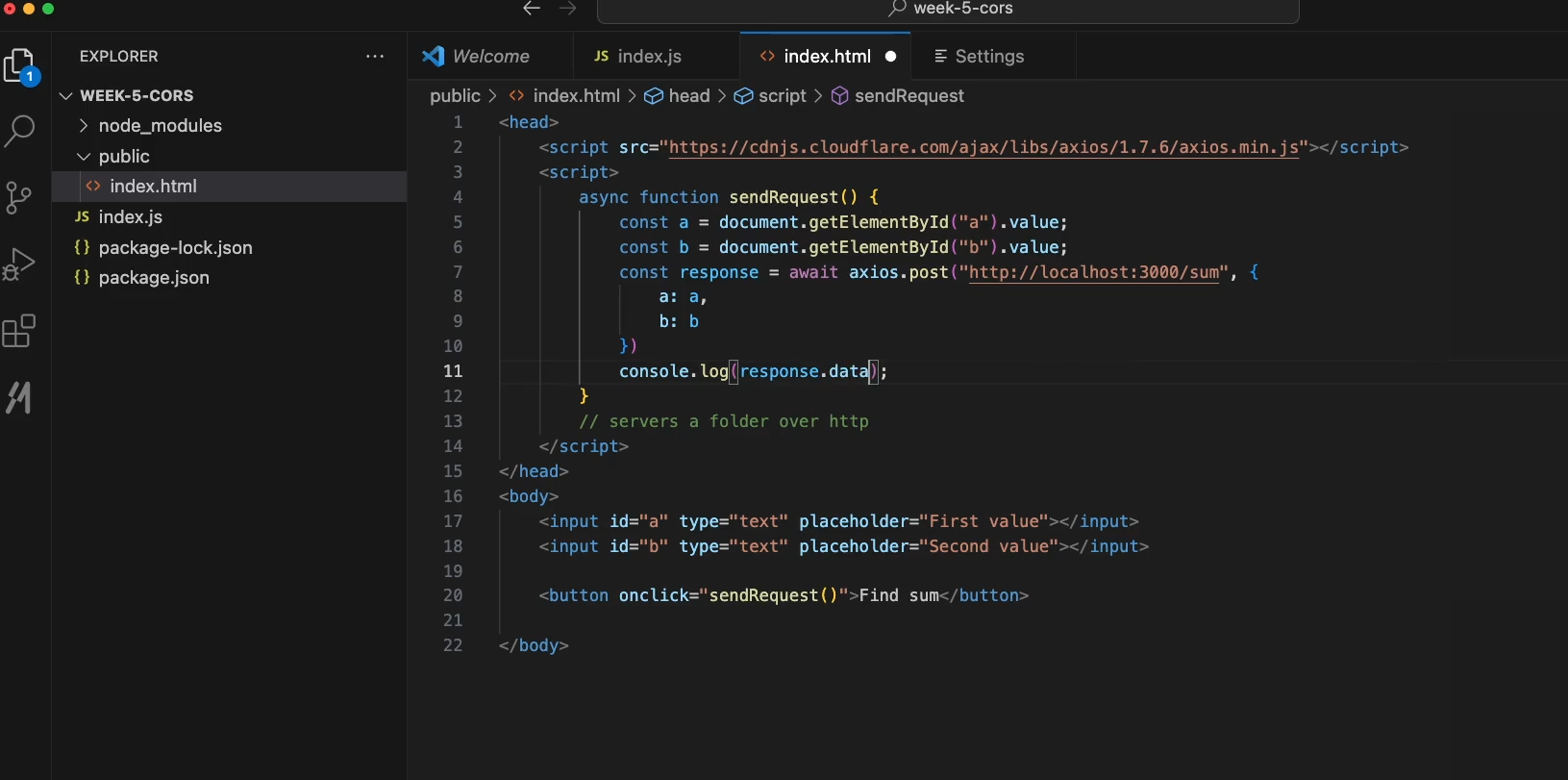
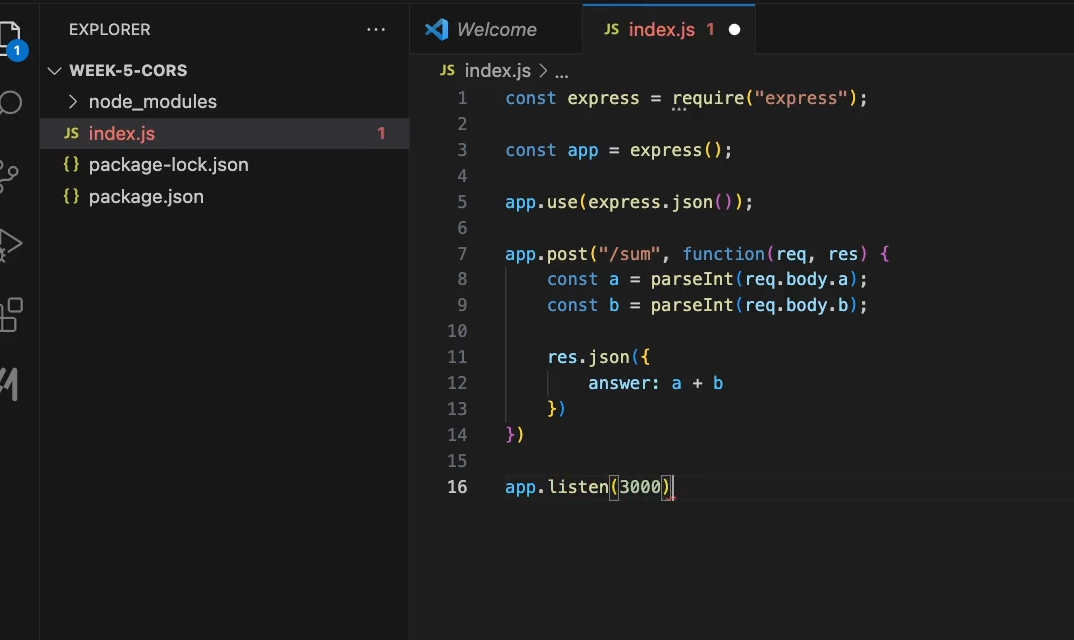

For resolving this issue we will use cors middleware.
Authentication - https://petal-estimate-4e9.notion.site/Authentincation-a4b43c7cc1d14535a7b5b366080095fa
Simply with token logic —
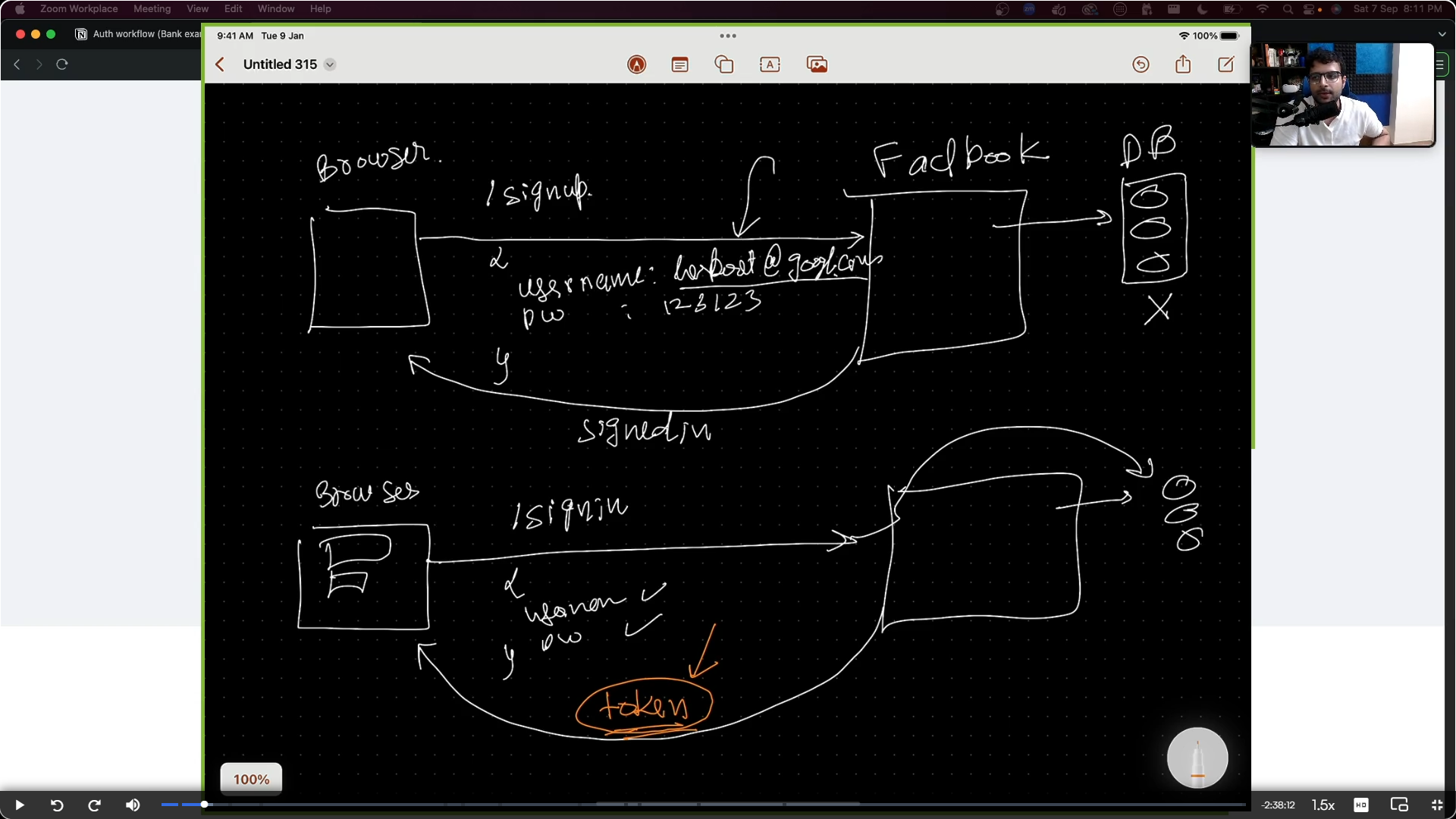
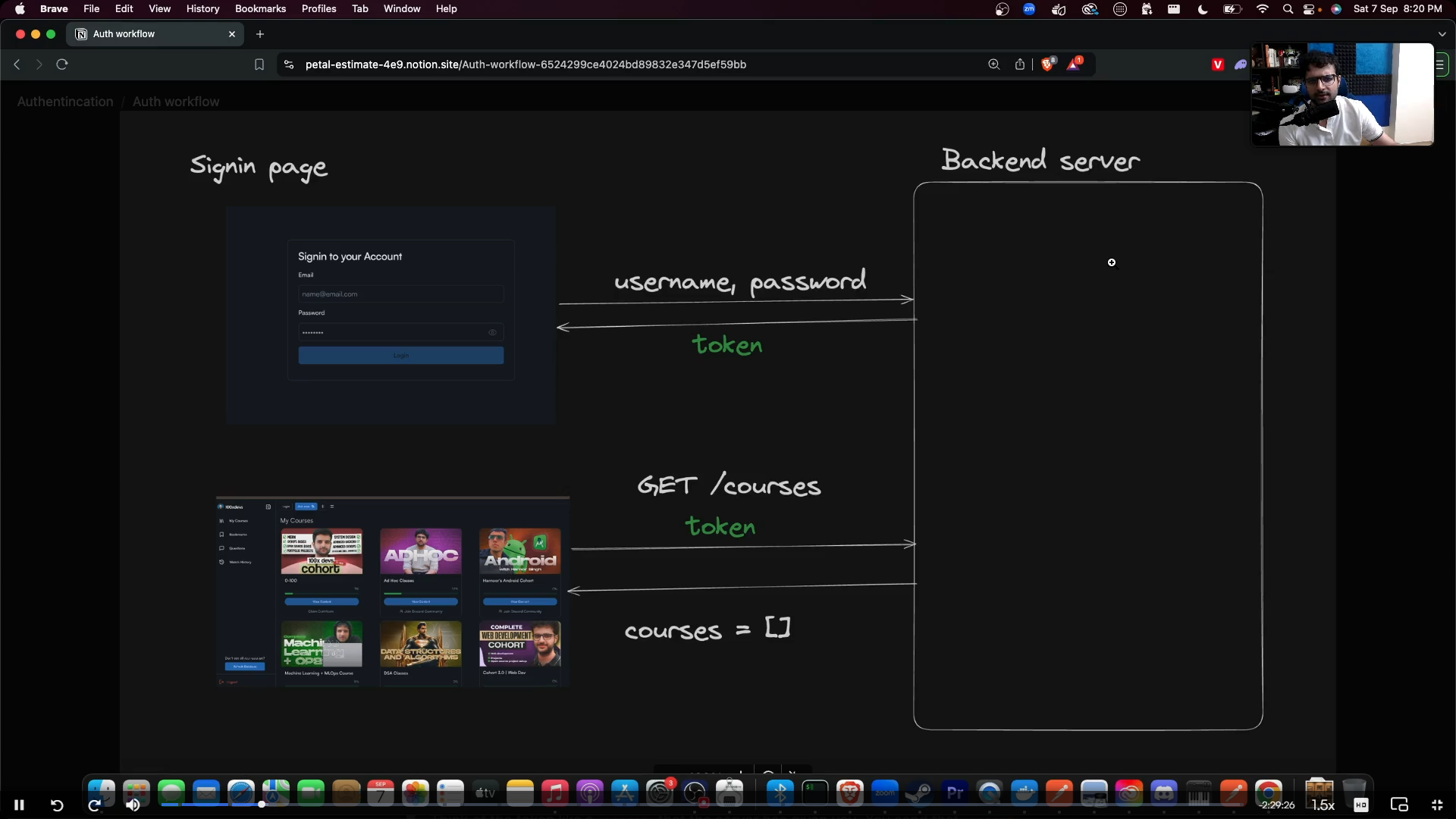
- The user comes to your website (courses.com)
- The user sends a request to
/signinwith theirusernameandpassword - The user gets back a
token - In every subsequent request, the user sends the token to identify it self to the backend.
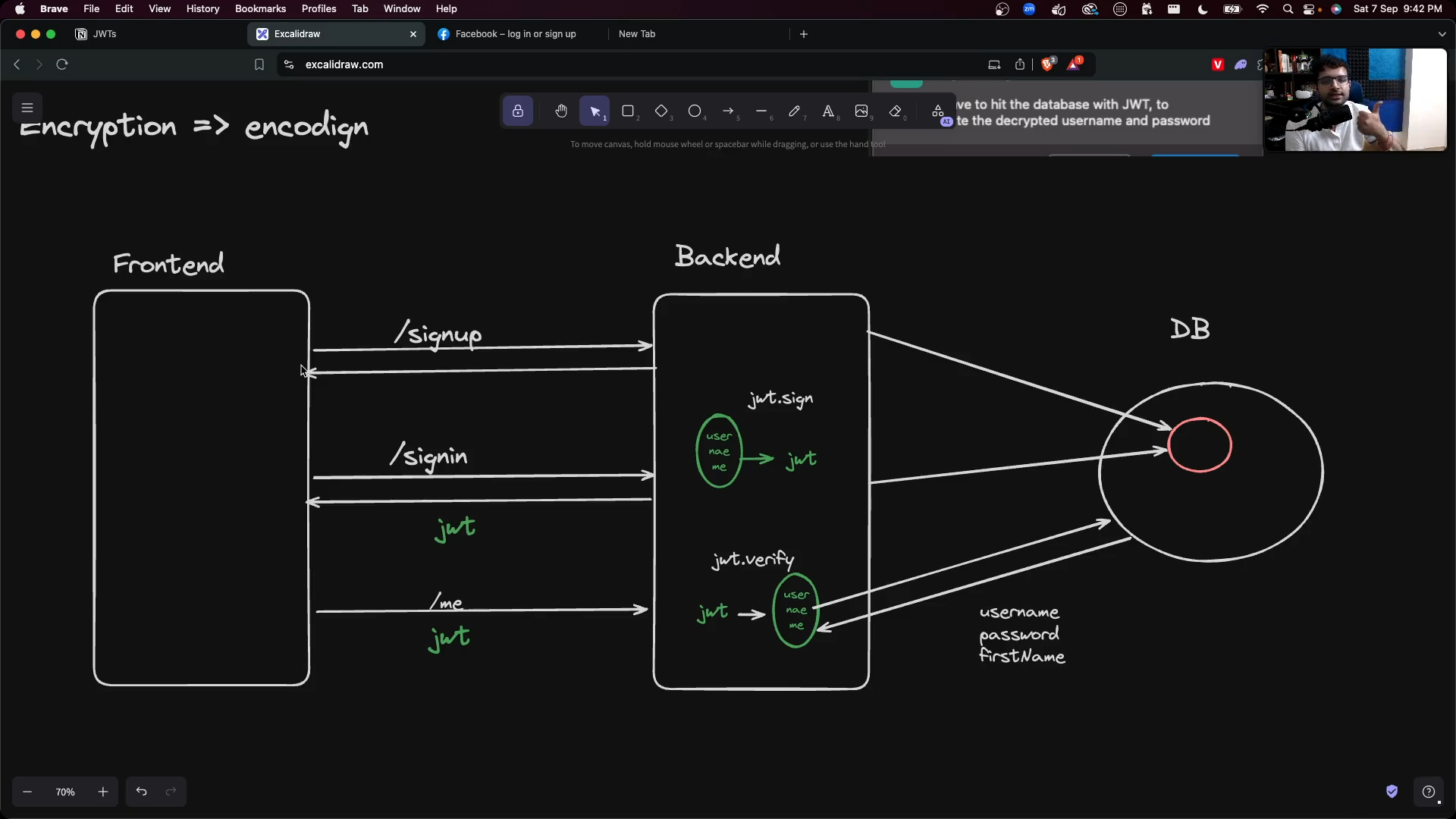
Now with the JWT —
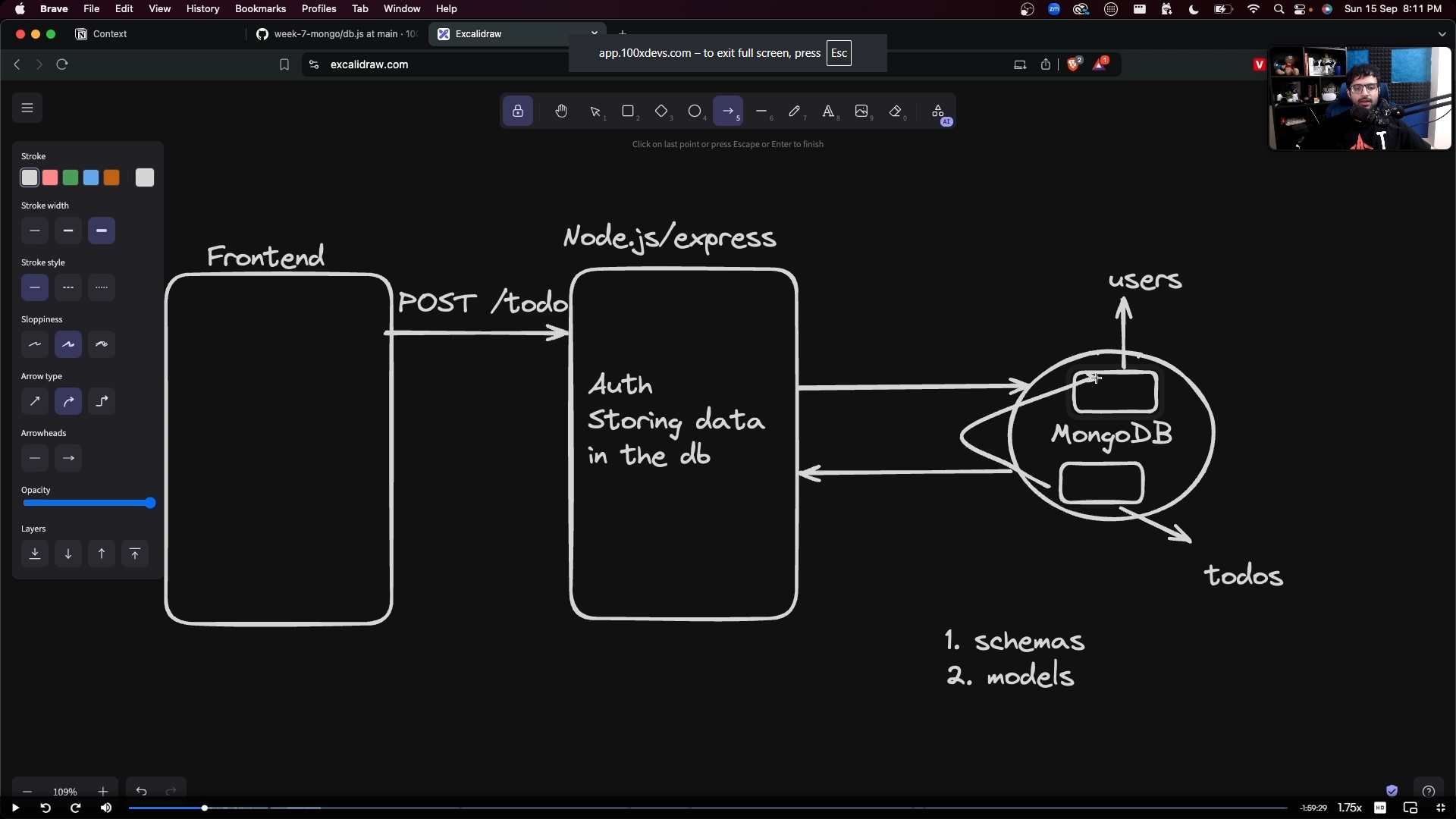
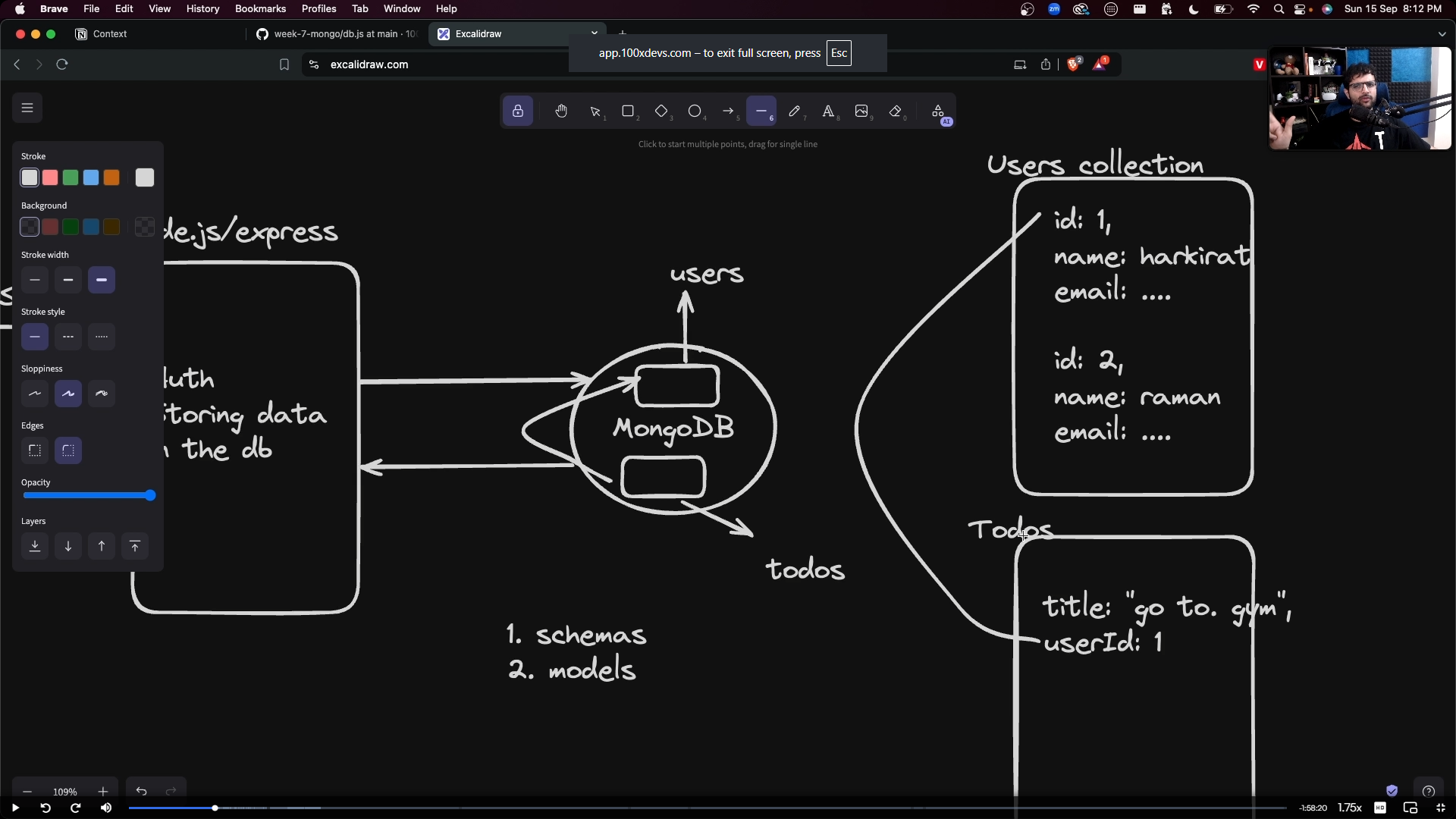
Database (NoSQL) MongoDB -
URL - https://petal-estimate-4e9.notion.site/Databases-and-MongoDb-1017dfd107358065a996cda5ed89682e
Passwords , ZOD -
https://petal-estimate-4e9.notion.site/Hashing-password-b821927535394ab6aec423eb74234975
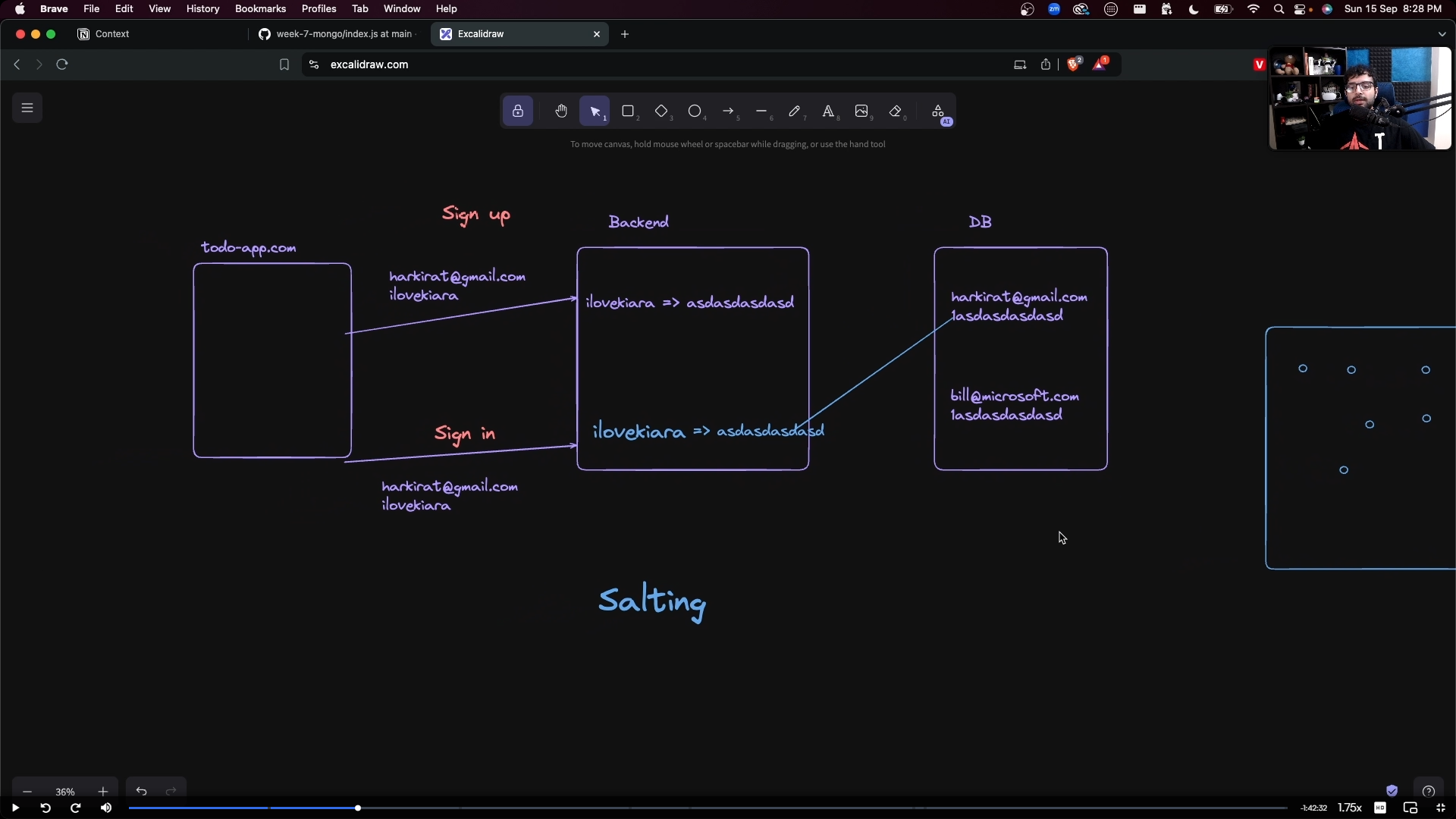
salting-
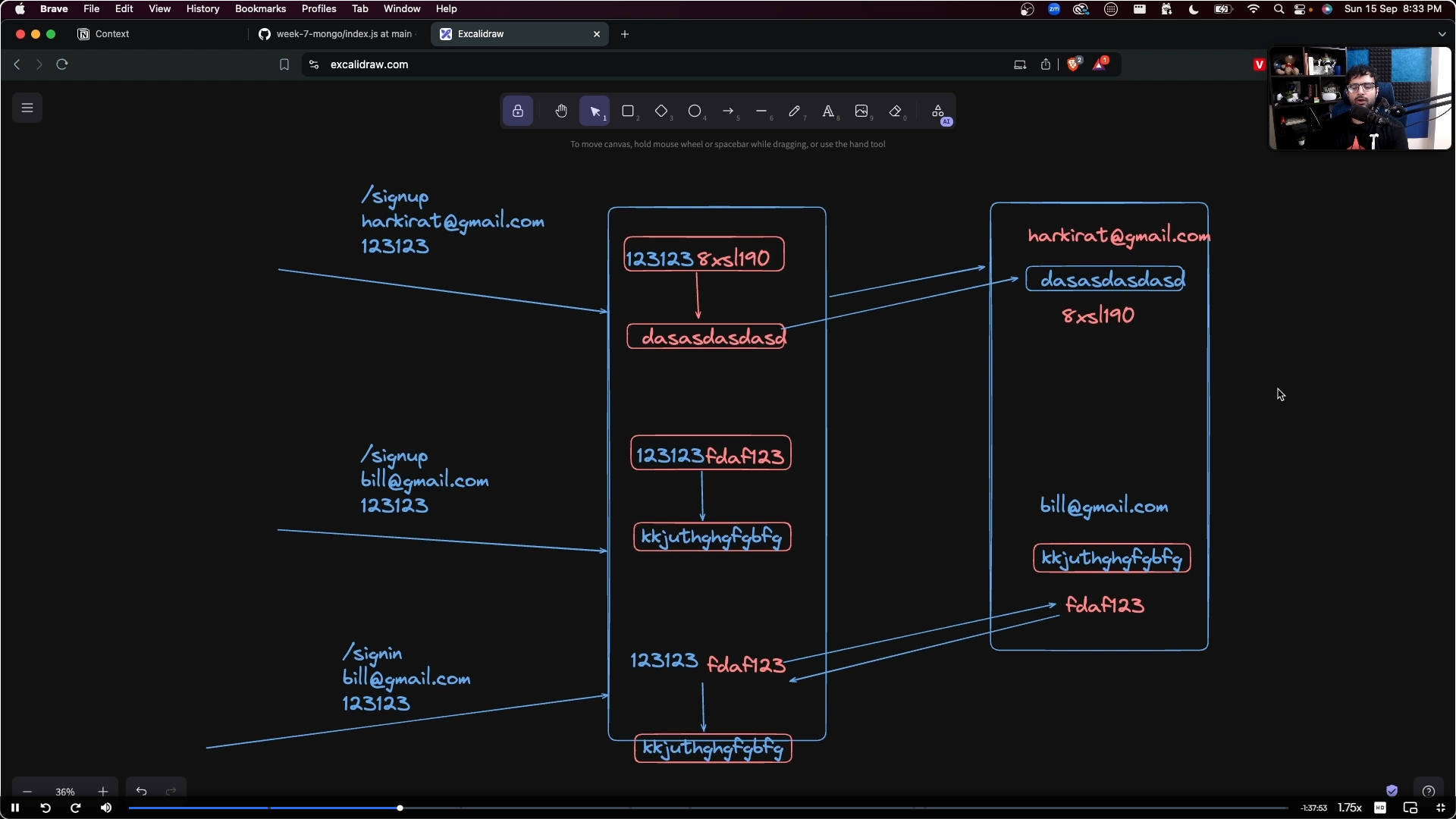
DevOps
Bash
Bash (short for Bourne-Again SHell) is a command-line interface and scripting language. It allows you to interact directly with an operating system's kernel using text-based commands. Developed for the GNU Project in 1989, it is the default shell on most Linux distributions and macOS
Bash stands for Bourne Again SHell. It is a command-line interpreter (shell) commonly used on Linux, macOS, and Unix-like operating systems.
A shell acts as a bridge between you and the operating system, letting you run commands, automate tasks, and manage files.
Navigation
bashpwd # Present working directory
ls # List files and folders
ls -la # List all files with details
cd dir # Change directory
cd .. # Move up one directory
cd ~ # Go to home directory
Different Types of ls Commands:
bashls # List files and folders
ls -l # Detailed list
ls -a # Show hidden files
ls -la # Detailed list + hidden files
ls -lah # Detailed list + hidden files + human-readable sizes
ls -h # Human-readable file sizes
ls -1 # One file per line
ls -lt # Sort by newest modified
ls -ltr # Sort by oldest modified
ls -lS # Sort by largest file size
ls -lSr # Sort by smallest file size
ls -lX # Sort by file extension
ls -r # Reverse sort order
ls -R # Recursive listing of all subdirectories
ls -d */ # List only directories
ls -ld dir # Show directory details only
ls -F # Show file type indicators
ls -p # Append / to directories
ls -i # Show inode numbers
ls -s # Show file size in blocks
ls -sh # Show file size in human-readable format
ls /home # List contents of /home
ls *.txt # List all .txt files
ls file* # List files starting with 'file'
ls | less # View output page by page
File Management
bashtouch file.txt # Create file
cp file1 file2 # Copy file
mv file1 file2 # Rename/move file
rm file.txt # Delete file
rm -rf folder # Delete folder recursively
Directory Management
bashmkdir folder # Create directory
mkdir -p a/b/c # Create nested directories
rmdir folder # Remove empty directory
File Viewing
bashcat file.txt # Display entire file
less file.txt # View file page by page
head file.txt # First 10 lines
tail file.txt # Last 10 lines
tail -f log.txt # Live log monitoring
Searching
bashfind . -name "*.txt" # Find files
grep "text" file.txt # Search text in file
grep -r "text" . # Recursive search
locate filename # Locate file
Permissions
bashchmod 755 file.sh # Change permissions
chmod +x file.sh # Make executable
chown user file.txt # Change owner
Process Management
bashps # List processes
ps aux # Detailed process list
top # Process monitor
htop # Interactive monitor
kill PID # Kill process
kill -9 PID # Force kill
System Information
bashwhoami # Current user
hostname # Hostname
uname -a # System information
date # Current date/time
uptime # System uptime
Networking
bashping google.com # Test connectivity
curl https://site.com # Fetch webpage/API
wget URL # Download file
ifconfig # Network info (older)
ip addr # Network info (modern)
netstat -tulnp # Open ports
grep = Global Regular Expression Print
Used to search text/patterns inside files.
bashgrep "hello" file.txt # Search word
grep -i "hello" file.txt # Ignore case
grep -v "hello" file.txt # Exclude matching lines
grep -n "hello" file.txt # Show line number
grep -c "hello" file.txt # Count matches
grep -r "hello" /home # Recursive search
grep -w "hello" file.txt # Exact word match
grep -l "hello" *.txt # Show filenames only
grep -A 2 "error" log.txt # 2 lines after match
grep -B 2 "error" log.txt # 2 lines before match
grep -C 2 "error" log.txt # 2 lines before & after
grep "^hello" file.txt # Starts with hello
grep "hello$" file.txt # Ends with hello
grep "[0-9]" file.txt # Search numbers
sed = Stream Editor
Used to find, replace, delete, insert, and modify text.
bashsed 's/old/new/' file.txt # Replace first occurrence
sed 's/old/new/g' file.txt # Replace all occurrences
sed -i 's/old/new/g' file.txt # Update file directly
sed '1d' file.txt # Delete line 1
sed '2,5d' file.txt # Delete lines 2-5
sed '/error/d' file.txt # Delete matching lines
sed -n '1p' file.txt # Print line 1
sed -n '1,5p' file.txt # Print lines 1-5
sed '3i\New Line' file.txt # Insert line before line 3
sed '3a\New Line' file.txt # Append after line 3
sed '3c\New Text' file.txt # Change line 3
sed 's/^/Mr./' file.txt # Add text at start
sed 's/$/End/' file.txt # Add text at end
sed '/start/,/end/p' file.txt # Print range
sed '$d' file.txt # Delete last line
awk = Pattern Scanning and Processing Tool
Used to process columns and rows of data.
bashawk '{print $1}' file.txt # Print first column
awk '{print $2}' file.txt # Print second column
awk '{print $1,$3}' file.txt # Print multiple columns
awk '/error/' file.txt # Search pattern
awk '/error/ {print $0}' file.txt # Print matching line
awk 'NR==1' file.txt # Print first row
awk 'NR<=5' file.txt # Print first 5 rows
awk '{print NR,$0}' file.txt # Print line number
awk 'END {print NR}' file.txt # Count lines
awk '{sum+=$3} END {print sum}' file.txt # Sum column 3
awk '{print NF}' file.txt # Number of fields
awk '{print $NF}' file.txt # Last column
awk -F "," '{print $1}' file.csv # CSV first column
awk '$3 > 100' file.txt # Filter numeric values
awk '{print toupper($0)}' file.txt # Uppercase
awk '{print tolower($0)}' file.txt # Lowercase
What is a VM

VMs run on a physical server (called the host) but are abstracted through a layer of virtualization software called a hypervisor (e.g., VMware, KVM). This hypervisor divides the host machine’s resources (CPU, memory, storage) into separate virtual machines.
Each VM acts like a completely independent machine, even though they share the underlying hardware. You can run different operating systems and applications in different VMs on the same physical server.
VMs are highly flexible and easy to scale. You can quickly spin up, modify, or delete VMs, and you can consolidate multiple workloads on a single server.
The virtualization layer introduces a slight overhead in terms of performance because the hypervisor needs to manage resources and ensure each VM operates independently. However, with modern hypervisors and powerful hardware, this overhead is minimal.

Bare metal servers
n a bare-metal setup, an operating system (OS) runs directly on the physical hardware without a hypervisor in between. There’s no virtualization layer.
Since there's no hypervisor, bare-metal systems tend to offer better performance, as the OS can directly access all the server’s resources without sharing them with other instances. This is especially important for high-performance applications like large databases, gaming servers, or mining crypto
With bare-metal, you’re typically limited to the resources (CPU, memory, storage) of the actual physical server. You can't dynamically allocate resources like you can in a VM.

SSH protocol, password based auth
The SSH protocol (Secure Shell) is a cryptographic network protocol that allows secure communication between two systems, typically for remote administration. It’s most commonly used to log into remote servers and execute commands, but it also facilitates secure file transfers and other operations.
Key Features of SSH:
Encryption: SSH encrypts the data that’s sent between the client and the server, so even if someone intercepts the connection, they can’t read the data. This makes it much more secure than older protocols like Telnet or FTP, which transmit data in plaintext.
Authentication: SSH can use two methods of authentication:
Password-based: You enter a password to authenticate yourself to the remote system.
Public Key-based: A more secure method, where the client uses a private key to authenticate, and the server checks it against the corresponding public key. This eliminates the need for passwords and provides an extra layer of security.
Integrity: SSH ensures the integrity of data, meaning that data cannot be tampered with while it’s in transit. If someone tries to alter the data being sent, the connection will be immediately disrupted.
Password based
While setting up a server, select password based authentication
Example from digitalocean


bashssh ubuntu@SERVER_IP or ssh root@SERVER_IP
SSH protocol, ssh keypair based
Generate a new public private keypair
ssh-keygen
Explore your public and private key
cat ~/.ssh/id_rsa.pub cat ~/.ssh/id_rsa
Try adding it to Github so you can push to github without password
Try adding it to digitalocean and ssh using it.
ssh ubuntu@IP or git clone git@github.com:100xdevs-cohort-3/week-24-deposit-with-infra.git (try a private repo)

Check authorized_keys
cat ~/.ssh/authorized_keys
How to hack your friends laptop?
Put your public key in your friends laptop as an authorized key.
Algorithms for public key cryptography
The ssh-keygen tool can generate SSH key pairs using several different cryptographic algorithms, depending on what you choose during the key creation process. By default, it typically uses RSA, but you can specify other algorithms as well. Here are the most commonly used algorithms:
1. RSA (Rivest–Shamir–Adleman)
Default Algorithm (for most systems): The ssh-keygen tool uses RSA by default when creating keys.
RSA is a widely-used public-key algorithm that provides strong security.
2. Ed25519
A newer and more secure option: Ed25519 is a modern elliptic curve algorithm that is designed to provide both high security and efficiency.
It’s faster, more secure for the same key size, and less prone to certain vulnerabilities compared to RSA.
ssh-keygen -t ed25519
3. ECDSA (Elliptic Curve Digital Signature Algorithm)
Another elliptic curve algorithm, which is considered a more secure and efficient alternative to RSA for most use cases.
IP address of your machine
If you get a VM on digitalocean, there is an associated IP address to it. This is a public IP address that you can use to reach the server anywhere around the world

Stun Protocol -
STUN (Session Traversal Utilities for NAT) is a network protocol that helps devices discover their public IP address and port when they are behind a NAT (Network Address Translation) device, such as a home router. It is commonly used in real-time communication systems like WebRTC, VoIP, video conferencing, and online gaming.
Why is STUN needed?
When a device is behind a NAT:
- It has a private IP address (e.g.,
192.168.1.10). - External devices cannot directly see or connect to that private address.
- The device needs to know what public IP and port the NAT assigned to its traffic.
How STUN works
- A client sends a STUN Binding Request to a publicly accessible STUN server.
- The request passes through the NAT.
- The STUN server observes the source public IP address and port.
- The server replies with that information.
- The client learns how it appears on the public Internet.
plainClient (192.168.1.10) | NAT Router | Internet | STUN Server Response: Public IP = 203.0.113.5 Public Port = 54321
Common use cases
- WebRTC (browser voice/video calls)
- SIP/VoIP systems
- Peer-to-peer applications
- Online gaming
- Connectivity testing and NAT keep-alives
Reverse Proxy
A reverse proxy is a server that sits between clients (users) and backend servers. Instead of users connecting directly to your application server, they connect to the reverse proxy, which forwards requests to the appropriate backend server and returns the response.
Why use a Reverse Proxy?
- Load Balancing – Distributes traffic across multiple servers
- Security – Hides backend server IP addresses from users and attackers.
- SSL/TLS Termination – Handles HTTPS encryption, reducing load on backend servers
- Caching – Stores frequently requested content for faster responses.
- High Availability – Routes traffic away from unhealthy servers.
Reverse Proxy vs Forward Proxy
| Forward Proxy | Reverse Proxy |
|---|---|
| Represents the client | Represents the server |
| Hides client identity | Hides server identity |
| Used for internet access control | Used for application delivery and security |
Nginx Configuration-
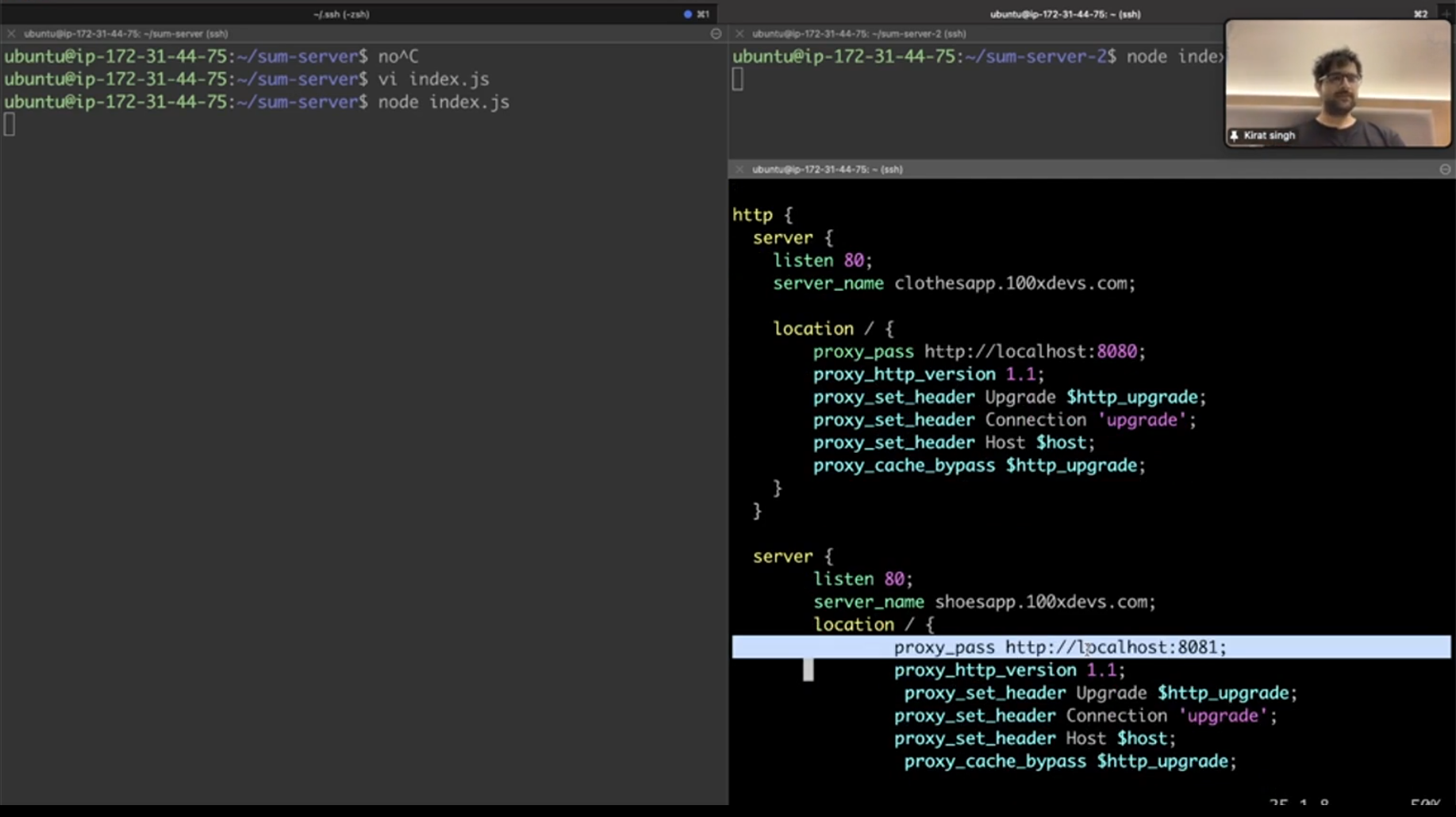
It means any http request which comes to port 80 from the respective url (clothesapp or shoesapp) it will forwarded to http://localhost:8080 or 8081.