PyTorch
Why use PyTorch?
Machine learning researchers love using PyTorch.
And as of February 2022, PyTorch is the most used deep learning framework on Papers With Code, a website for tracking machine learning research papers and the code repositories attached with them.
PyTorch also helps take care of many things such as GPU acceleration (making your code run faster) behind the scenes.
So you can focus on manipulating data and writing algorithms, and PyTorch will make sure it runs fast.
And if companies such as Tesla and Meta (Facebook) use it to build models they deploy to power hundreds of applications, drive thousands of cars and deliver content to billions of people, it's clearly capable on the development front too.
Tensors: Tensors are the basic building block of all of machine learning and deep learning. Tensors can represent almost any kind of data (images, words, tables of numbers.
Tensor Types by Dimensionality
| Name | Dimensions | Example |
|---|---|---|
| Scalar | 0D | torch.tensor(7) |
| Vector | 1D | torch.tensor([7, 7]) |
| Matrix | 2D | torch.tensor([[7, 8], [9, 10]]) |
| Tensor | nD | 3D+ (images, batches, etc.) |
We Will Build and Train a Neural Network From Scratch
Intro
You've seen PyTorch code. Maybe in a research paper or a tutorial. You saw model.train(), loss.backward(), and optimizer.step().
You wondered what they actually do.
Maybe you tried to read the documentation. Got hit with a wall of classes. nn.Module, torch.optim, computation graphs. It felt like opaque, magical black boxes.
Here's the truth: They're not black boxes. They are elegant wrappers for the linear algebra and calculus you already know.
The entire deep learning training process, from the simplest model to a giant LLM, is just a five-step algorithm. That's it. Everything else is just an implementation detail.
- The
nn.Linearlayer? It's justX @ W + b. - The loss function? Just a formula to measure error, like
torch.mean((y - y_hat)**2). - The magical
loss.backward()? It's just your old friend, the chain rule (backpropagation), automated. - The
optimizer.step()? It's just the gradient descent update rule:W -= learning_rate * W.grad.
In this guide, we'll implement the raw math first, then use PyTorch's professional tools.
You'll see why the tools exist by first doing the work manually. Once you've implemented the raw math, the professional code becomes obvious—just a clean, powerful way to organize what you've already built.
And it all boils down to these 5 steps.
Master this five-step loop, and you can understand the training code for any model, from a simple regression to a state-of-the-art Large Language Model.
| Step | Concept (Math) | From Scratch (Raw Tensors) | Professional (torch.nn) |
|---|---|---|---|
| 1. Prediction | Make a prediction:ŷ = f(X, θ) | y_hat = X @ W + b | y_hat = model(X) |
| 2. Loss Calc | Quantify the error:L = Loss(ŷ, y) | loss = torch.mean((y_hat - y)**2) | loss = criterion(y_hat, y) |
| 3. Gradient Calc | Find the slope of the loss:∇_θ L | loss.backward() | loss.backward() |
| 4. Param Update | Step down the slope:θ_t+1 = θ_t - η * ∇_θ L | W -= lr * W.grad | optimizer.step() |
| 5. Gradient Reset | Reset for the next loop. | W.grad.zero_() | optimizer.zero_grad() |
Even better—this loop is universal. The model in Step 1 might become a massive Transformer, and the optimizer in Step 4 might be a fancy one like Adam, but the fundamental five-step logic never changes.
This isn't an analogy. The nn.Linear layer used in LLMs is the exact same X @ W + b operation you will build in Part 2. The Feed-Forward Network inside a Transformer is the exact same stack of layers you will build in Part 4. You are learning the literal, fundamental building blocks of modern AI.
Give me one hour. We'll build your understanding from the ground up. Raw math, real code, and a clear path to the professional tools.
Ready? Let's begin.
Part 1: The Core Data Structure - torch.Tensor
Welcome to PyTorch! Everything we do—from loading data to defining complex neural networks—will be built on one core object: the torch.Tensor.
The Analogy: Think of a Tensor as the fundamental building block, the basic "noun" of the PyTorch language. It's a multi-dimensional array, very similar to a NumPy array, but with special powers for deep learning that we will unlock step-by-step.
Our goal in this section is to master this single, crucial object: how to create it and how to understand its properties.
1.1. The Three Common Patterns for Creating Tensors
There are many ways to create a tensor, but they generally fall into three common patterns you'll see everywhere.
Pattern 1: Direct Creation from Existing Data
This is the most straightforward. You have a Python list of numbers, and you want to convert it into a PyTorch tensor using torch.tensor().
pythonimport torch
# Input: A standard Python list
data = [[1, 2, 3], [4, 5, 6]]
my_tensor = torch.tensor(data)
print(my_tensor)
Output:
powershelltensor([[1, 2, 3], [4, 5, 6]])
Pattern 2: Creation from a Desired Shape
This is extremely common when building models. You don't know the exact values for your weights yet, but you know the dimensions (shape) you need.
torch.ones()ortorch.zeros(): Fills the tensor with1s or0s.torch.randn(): Fills the tensor with random numbers from a standard normal distribution. This is the standard way to initialize a model's weights.
python# Input: A shape tuple (2 rows, 3 columns)
shape = (2, 3)
# Create tensors with this shape
ones = torch.ones(shape)
zeros = torch.zeros(shape)
random = torch.randn(shape)
print(f"Ones Tensor:\n {ones}\n")
print(f"Zeros Tensor:\n {zeros}\n")
print(f"Random Tensor:\n {random}")
Output:
powershellOnes Tensor: tensor([[1., 1., 1.], [1., 1., 1.]]) Zeros Tensor: tensor([[0., 0., 0.], [0., 0., 0.]]) Random Tensor: tensor([[ 0.3815, -0.9388, 1.6793], [-0.3421, 0.5898, 0.3609]])
Pattern 3: Creation by Mimicking Another Tensor's Properties
Often, you have an existing tensor and you need to create a new one that has the exact same shape, data type, and is on the same device. Instead of manually copying these properties, PyTorch provides handy _like functions.
python# Input: A 'template' tensor
template = torch.tensor([[1, 2], [3, 4]])
# Create new tensors with the same properties as the template
ones_like = torch.ones_like(template)
rand_like = torch.randn_like(template, dtype=torch.float) # dtype can be overridden
print(f"Template Tensor:\n {template}\n")
print(f"Ones_like Tensor:\n {ones_like}\n")
print(f"Randn_like Tensor:\n {rand_like}")
Output:
powershellTemplate Tensor: tensor([[1, 2], [3, 4]]) Ones_like Tensor: tensor([[1, 1], [1, 1]]) Randn_like Tensor: tensor([[-1.1713, -0.2032], [ 0.3391, -0.8267]])
1.2. What's Inside a Tensor? Shape, Type, and Device
Every tensor has attributes that describe its metadata. The three you will use constantly are .shape, .dtype, and .device.
python# Let's create a tensor to inspect
tensor = torch.randn(2, 3)
print(f"Shape of tensor: {tensor.shape}")
print(f"Datatype of tensor: {tensor.dtype}")
print(f"Device tensor is stored on: {tensor.device}")
Output:
powershellShape of tensor: torch.Size([2, 3]) Datatype of tensor: torch.float32 Device tensor is stored on: cpu
Let's break these down:
.shape: This is a tuple that describes the dimensions of the tensor.torch.Size([2, 3])tells us it's a 2D tensor with 2 rows and 3 columns. This is the most important attribute for debugging your models. Mismatched shapes are the #1 source of errors in PyTorch..device: This tells you where the tensor's data is physically stored. By default, it's on thecpu. If you have a compatible GPU, you can move it there (.to("cuda")) for massive speedups..dtype: This describes the data type of the numbers inside the tensor. Notice it defaulted totorch.float32. This is not an accident, and it's critically important.
A Quick but Critical Note on dtype
Why torch.float32 and not just regular integers (int64)? The answer is gradients.
Gradient descent, the engine of deep learning, works by making tiny, continuous adjustments to a model's weights. These adjustments are fractional numbers (like -0.0012), which require a floating-point data type. You can't nudge a parameter from 3 to 3.001 if your data type only allows whole numbers.
Key Takeaway:
- Model parameters (weights and biases) must be a float type (
float32is the standard). - Data that represents categories or counts (like word IDs) can be integers (
int64).
We now know what a torch.Tensor is and how to create one using three common patterns. We've essentially learned about the raw material.
Now, let's explore the single most important switch that turns this simple data container into a core component of a dynamic learning machine. Let's move on to Part 2: The Engine of Autograd.
Part 2: The Engine of Autograd - requires_grad
In Part 1, we learned that tensors are containers for numbers. But their real power comes from a system called Autograd, which stands for automatic differentiation. This is PyTorch's built-in gradient calculator.
The Analogy: If a tensor is the "noun" in PyTorch, then Autograd is the "nervous system." It connects all the operations and allows signals (gradients) to flow backward through the system, enabling learning.
Our goal here is to understand the one simple switch that activates this nervous system.
2.1. The "Magic Switch": requires_grad=True
By default, PyTorch assumes a tensor is just static data. To tell it that a tensor is a learnable parameter (like a model's weight or bias), you must set its requires_grad attribute to True.
This is the most important setting in all of PyTorch. It tells Autograd:
"This is a parameter my model will learn. From now on, track every single operation that happens to it."
python# A standard data tensor (we don't need to calculate gradients for our input data)
x_data = torch.tensor([[1., 2.], [3., 4.]])
print(f"Data tensor requires_grad: {x_data.requires_grad}\n")
# A parameter tensor (we need to learn this, so we need gradients)
w = torch.tensor([[1.0], [2.0]], requires_grad=True)
print(f"Parameter tensor requires_grad: {w.requires_grad}")
Output:
powershellData tensor requires_grad: False Parameter tensor requires_grad: True
2.2. The Computation Graph: How PyTorch Remembers
Once you set requires_grad=True, PyTorch starts building a computation graph behind the scenes. Think of it as a history of all the operations. Every time you perform an operation on a tensor that requires gradients, PyTorch adds a new node to this graph.
Let's build a simple one. We'll compute z = x * y where y = a + b.
python# Three parameter tensors that we want to learn
a = torch.tensor(2.0, requires_grad=True)
b = torch.tensor(3.0, requires_grad=True)
x = torch.tensor(4.0, requires_grad=True)
# First operation: y = a + b
y = a + b
# Second operation: z = x * y
z = x * y
print(f"Result of a + b: {y}")
print(f"Result of x * y: {z}")
Output:
plainResult of a + b: 5.0 Result of x * y: 20.0
The math is simple. But behind the scenes, PyTorch has built a graph connecting a, b, x, y, and z.
2.3. Peeking Under the Hood: The .grad_fn Attribute
How can we prove this graph exists? Every tensor that is the result of an operation on a requires_grad tensor will have a special attribute called .grad_fn. This attribute is a "breadcrumb" that points to the function that created it.
Let's inspect the tensors from our previous example.
python# z was created by multiplication
print(f"grad_fn for z: {z.grad_fn}")
# y was created by addition
print(f"grad_fn for y: {y.grad_fn}")
# a was created by the user, not by an operation, so it has no grad_fn
print(f"grad_fn for a: {a.grad_fn}")
Output:
plaingrad_fn for z: <MulBackward0 object at 0x10f7d3d90> grad_fn for y: <AddBackward0 object at 0x10f7d3d90> grad_fn for a: None
This is the tangible proof of the computation graph. PyTorch knows z came from a multiplication (MulBackward0) and y came from an addition (AddBackward0). When we later ask it to compute gradients, it will use this information to trace its way backward through the graph using the chain rule.
2.4. Visualizing the Graph
Here is what the graph we just created looks like. The grad_fn is the "arrow" leading to each new tensor.
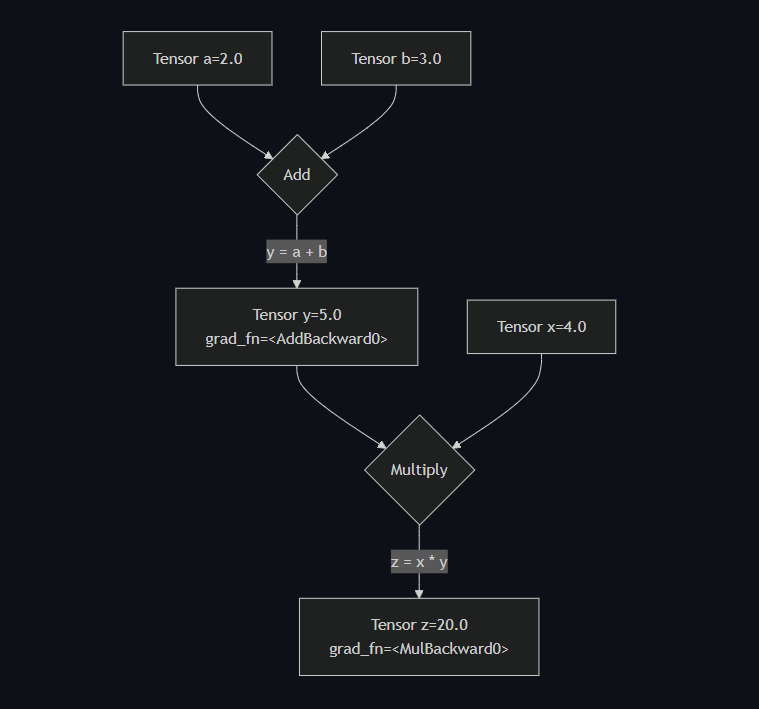
We have now learned how to activate PyTorch's "nervous system" by setting requires_grad=True. This allows PyTorch to build a computation graph and remember the history of all operations.
We have built the network of roads. In the next parts, we'll learn the common operations (the "verbs") and then see how to send the gradient signal flowing backward along these roads to enable learning. Let's move on to Part 3: Basic Mathematical & Reduction Operations.
Part 3: Basic Mathematical & Reduction Operations
We have our Tensor (the noun) and Autograd (the nervous system). Now we need operations (the verbs) to describe the calculations our model will perform. In deep learning, the vast majority of these operations are surprisingly simple: matrix multiplications and aggregations.
Our goal is to master these core verbs and, most importantly, the critical dim argument that controls how they work.
3.1. Mathematical Operations: vs. @
This is the single most common point of confusion for beginners. PyTorch has two very different kinds of multiplication.
1. Element-wise Multiplication (*) This operation multiplies elements in the same position. It's like overlaying two tensors and multiplying the corresponding cells. The tensors must have the same shape.
pythona = torch.tensor([[1, 2], [3, 4]])
b = torch.tensor([[10, 20], [30, 40]])
# Calculation: [[1*10, 2*20], [3*30, 4*40]]
element_wise_product = a * b
print(f"Tensor a:\n {a}\n")
print(f"Tensor b:\n {b}\n")
print(f"Element-wise Product (a * b):\n {element_wise_product}")
Output:
plainTensor a: tensor([[1, 2], [3, 4]]) Tensor b: tensor([[10, 20], [30, 40]]) Element-wise Product (a * b): tensor([[ 10, 40], [ 90, 160]])
2. Matrix Multiplication (@) This is the standard matrix product from linear algebra. It's the core operation of every Linear layer in a neural network. For m1 @ m2, the number of columns in m1 must equal the number of rows in m2.
pythonm1 = torch.tensor([[1, 2, 3], [4, 5, 6]]) # Shape: (2, 3)
m2 = torch.tensor([[7, 8], [9, 10], [11, 12]]) # Shape: (3, 2)
# Calculation for the first element: (1*7) + (2*9) + (3*11) = 58
matrix_product = m1 @ m2 # Resulting shape: (2, 2)
print(f"Matrix 1 (shape {m1.shape}):\n {m1}\n")
print(f"Matrix 2 (shape {m2.shape}):\n {m2}\n")
print(f"Matrix Product (m1 @ m2):\n {matrix_product}")
Output:
powershellMatrix 1 (shape torch.Size([2, 3])): tensor([[1, 2, 3], [4, 5, 6]]) Matrix 2 (shape torch.Size([3, 2])): tensor([[ 7, 8], [ 9, 10], [11, 12]]) Matrix Product (m1 @ m2): tensor([[ 58, 64], [139, 154]])
3.2. Reduction Operations
A "reduction" is any operation that reduces the number of elements in a tensor, often by aggregating them. Examples include sum(), mean(), max(), and min().
pythonscores = torch.tensor([[10., 20., 30.], [5., 10., 15.]])
# By default, reductions apply to the entire tensor
total_sum = scores.sum()
average_score = scores.mean()
print(f"Scores Tensor:\n {scores}\n")
# Calculation: 10 + 20 + 30 + 5 + 10 + 15 = 90
print(f"Total Sum: {total_sum}")
# Calculation: 90 / 6 = 15
print(f"Overall Mean: {average_score}")
Output:
powershellScores Tensor: tensor([[10., 20., 30.], [ 5., 10., 15.]]) Total Sum: 90.0 Overall Mean: 15.0
3.3. The dim Argument: The Most Important Detail
This is where reductions become powerful. The dim argument tells the function which dimension to collapse.
A simple rule of thumb for 2D tensors:
dim=0: Collapses the rows (operates "vertically" ⬇️).dim=1: Collapses the columns (operates "horizontally" ➡️).
Let's use our scores tensor (2 students, 3 assignments) to see this.
pythonscores = torch.tensor([[10., 20., 30.], [5., 10., 15.]])
# To get the sum FOR EACH ASSIGNMENT, we collapse the student dimension (dim=0)
# Calculation: [10+5, 20+10, 30+15]
sum_per_assignment = scores.sum(dim=0)
# To get the sum FOR EACH STUDENT, we collapse the assignment dimension (dim=1)
# Calculation: [10+20+30, 5+10+15]
sum_per_student = scores.sum(dim=1)
print(f"Original Scores:\n {scores}\n")
print(f"Sum per assignment (dim=0): {sum_per_assignment}")
print(f"Sum per student (dim=1): {sum_per_student}")
Output:
powershellOriginal Scores: tensor([[10., 20., 30.], [ 5., 10., 15.]]) Sum per assignment (dim=0): tensor([15., 30., 45.]) Sum per student (dim=1): tensor([60., 30.])
This table visualizes exactly what happened:
scores | Assignment 1 | Assignment 2 | Assignment 3 | sum(dim=1) ➡️ |
|---|---|---|---|---|
| Student 1 | 10 | 20 | 30 | 60 |
| Student 2 | 5 | 10 | 15 | 30 |
sum(dim=0) ⬇️ | 15 | 30 | 45 |
Mastering the dim argument is essential for everything from calculating loss functions to implementing attention mechanisms.
We now have the basic vocabulary of calculation and aggregation. We know how to multiply matrices and how to sum up results across specific dimensions.
Now let's look at more advanced "verbs" for selecting and manipulating data. Let's move on to Part 4: Advanced Indexing & Selection Primitives.
Part 4: Advanced Indexing & Selection Primitives
If basic math ops are the "verbs" of PyTorch, then indexing primitives are the "adverbs" and "prepositions"—they let you specify which data to act upon with great precision.
Our goal is to learn how to select data in increasingly sophisticated ways, moving from uniform block selection to dynamic, per-row lookups.
4.1. Standard Indexing: The Basics
This works just like in Python lists or NumPy. It's for selecting uniform "blocks" of data, like entire rows or columns.
python# A simple, easy-to-read tensor
x = torch.tensor([[0, 1, 2, 3],
[4, 5, 6, 7],
[8, 9, 10, 11]])
# Get the second row (at index 1)
row_1 = x[1]
print(f"Row 1: {row_1}\n")
# Get the third column (at index 2)
col_2 = x[:, 2]
print(f"Column 2: {col_2}\n")
# Get a specific element (row 1, column 3)
element_1_3 = x[1, 3]
print(f"Element at (1, 3): {element_1_3}")
Output:
powershellRow 1: tensor([4, 5, 6, 7]) Column 2: tensor([ 2, 6, 10]) Element at (1, 3): 7
4.2. Boolean Masking: Selection by Condition
Instead of using integer indices, you can use a boolean (True/False) tensor to select only the elements where the mask is True.
pythonx = torch.tensor([[0, 1, 2, 3], [4, 5, 6, 7]])
# Step 1: Create the boolean mask
mask = x > 3
print(f"The Boolean Mask (x > 3):\n {mask}\n")
# Step 2: Apply the mask to the tensor
selected_elements = x[mask]
print(f"Selected elements: {selected_elements}")
Output:
powershellThe Boolean Mask (x > 3): tensor([[False, False, False, False], [ True, True, True, True]]) Selected elements: tensor([4, 5, 6, 7])
Note: Boolean selection always returns a 1D tensor, as it pulls out only the matching values.
4.3. Conditional Creation: torch.where()
This is the tensor equivalent of a ternary if/else statement. It creates a new tensor by choosing values from two other tensors based on a condition. The syntax is torch.where(condition, value_if_true, value_if_false).
pythonx = torch.tensor([0, 1, 2, 3, 4, 5, 6, 7, 8, 9])
# Create a new tensor: if a value in x is > 4, use -1, otherwise use the original value
y = torch.where(x > 4, -1, x)
print(f"Original Tensor: {x}")
print(f"Result of where: {y}")
Output:
plainOriginal Tensor: tensor([0, 1, 2, 3, 4, 5, 6, 7, 8, 9]) Result of where: tensor([ 0, 1, 2, 3, 4, -1, -1, -1, -1, -1])
4.4. Primitives for Finding the "Best" Items
After a model makes a prediction, we often need to find the item with the highest score.
torch.argmax(): Finds the index of the single maximum value.torch.topk(): Finds theklargest values and their indices.
pythonscores = torch.tensor([
[10, 0, 5, 20, 1], # Scores for item 0
[1, 30, 2, 5, 0] # Scores for item 1
])
# Find the index of the best score for each item
best_indices = torch.argmax(scores, dim=1)
# For row 0, max is 20 at index 3. For row 1, max is 30 at index 1.
print(f"Argmax indices: {best_indices}\n")
# Find the top 3 scores and their indices for each item
top_values, top_indices = torch.topk(scores, k=3, dim=1)
print(f"Top 3 values:\n {top_values}\n")
print(f"Top 3 indices:\n {top_indices}")
Output:
plainArgmax indices: tensor([3, 1]) Top 3 values: tensor([[20, 10, 5], [30, 5, 2]]) Top 3 indices: tensor([[3, 0, 2], [1, 3, 2]])
4.5. Primitive for Dynamic Lookups: torch.gather()
This is the most advanced and powerful selection tool.
The Problem: Standard indexing is for uniform selection (e.g., "get column 2 for all rows"). But what if you need to select a different column for each row?
- From row 0, get the element at column 2.
- From row 1, get the element at column 0.
- From row 2, get the element at column 3.
The Solution: torch.gather() is purpose-built for this "dynamic lookup." You provide an index tensor that acts as a personalized list of which element to grab from each row.
pythondata = torch.tensor([
[10, 11, 12, 13], # row 0
[20, 21, 22, 23], # row 1
[30, 31, 32, 33] # row 2
])
# Our "personalized list" of column indices to select from each row
indices_to_select = torch.tensor([[2], [0], [3]])
# Gather from `data` along dim=1 (the column dimension)
selected_values = torch.gather(data, dim=1, index=indices_to_select)
print(f"Selected Values:\n {selected_values}")
Output:
plainSelected Values: tensor([[12], # From row 0, we gathered the element at index 2 [20], # From row 1, we gathered the element at index 0 [33]]) # From row 2, we gathered the element at index 3
This single, optimized operation avoids a slow Python for loop and is a cornerstone of many advanced model architectures.
We have now learned a powerful set of verbs for calculation, aggregation, and selection. We have all the tools we need.
It's time to put them together. Let's start building our neural network from scratch. Let's move on to Part 5: The Forward Pass - Manually Making a Prediction.
Part 5: The Forward Pass - Manually Making a Prediction
The "Forward Pass" is the process of taking input data and passing it forward through the model's layers to get an output, or prediction. It's the first step in our five-step training loop.
The Analogy: Think of the forward pass as the model's "guess." We show it a problem (the input X) and it gives us its current best answer (the prediction ŷ).
Our goal is to implement a simple linear regression model's forward pass from scratch, using only the raw tensor operations we've already learned.
5.1. The Model: Simple Linear Regression
Our model's job is to learn the relationship between one input variable (x) and one output variable (y). The formula from linear algebra is our blueprint:
ŷ = XW + b
Where:
Xis our input data.Wis the weight parameter.bis the bias parameter.ŷ(pronounced "y-hat") is our model's prediction.
Our goal is to find the best W and b to make ŷ as close to the true y as possible.
5.2. The Setup: Creating Our Data
We don't have a real dataset, so let's create a synthetic one. We'll generate data that follows a clear pattern, and then see if our model can learn it. Let's create data that follows the line y = 2x + 1, with a little bit of random noise added.
python# We'll create a "batch" of 10 data points
N = 10
# Each data point has 1 feature
D_in = 1
# The output for each data point is a single value
D_out = 1
# Create our input data X
# Shape: (10 rows, 1 column)
X = torch.randn(N, D_in)
# Create our true target labels y by applying the "true" function
# and adding some noise for realism
true_W = torch.tensor([[2.0]])
true_b = torch.tensor(1.0)
y_true = X @ true_W + true_b + torch.randn(N, D_out) * 0.1 # Add a little noise
print(f"Input Data X (first 3 rows):\n {X[:3]}\n")
print(f"True Labels y_true (first 3 rows):\n {y_true[:3]}")
Output:
plainInput Data X (first 3 rows): tensor([[-0.5186], [-0.2582], [-0.3378]]) True Labels y_true (first 3 rows): tensor([[-0.1030], [ 0.4491], [ 0.3340]])
5.3. The Parameters: The Model's "Brain"
Now, we create the parameters W and b that our model will learn. We initialize them with random values. Most importantly, we set requires_grad=True to tell PyTorch's Autograd engine to start tracking them.
python# Initialize our parameters with random values
# Shapes must be correct for matrix multiplication: X(10,1) @ W(1,1) -> (10,1)
W = torch.randn(D_in, D_out, requires_grad=True)
b = torch.randn(1, requires_grad=True)
print(f"Initial Weight W:\n {W}\n")
print(f"Initial Bias b:\n {b}")
Output:
plainInitial Weight W: tensor([[0.4137]], requires_grad=True) Initial Bias b: tensor([0.2882], requires_grad=True)
Our model's current "knowledge" is that the weight is 0.4137 and the bias is 0.2882. This is completely random and wrong, but it's a starting point.
5.4. The Implementation: From Math to Code
Now for the main event. We translate our mathematical formula ŷ = XW + b directly into a single line of PyTorch code.
python# Perform the forward pass to get our first prediction
y_hat = X @ W + b
print(f"Shape of our prediction y_hat: {y_hat.shape}\n")
print(f"Prediction y_hat (first 3 rows):\n {y_hat[:3]}\n")
print(f"True Labels y_true (first 3 rows):\n {y_true[:3]}")
Output:
plainShape of our prediction y_hat: torch.Size([10, 1]) Prediction y_hat (first 3 rows): tensor([[ 0.0737], [ 0.1812], [ 0.1485]], grad_fn=<AddBackward0>) True Labels y_true (first 3 rows): tensor([[-0.1030], [ 0.4491], [ 0.3340]])
Notice two things:
- The shape of
y_hatis(10, 1), which perfectly matches the shape ofy_true. This is crucial. y_hathas agrad_fn=<AddBackward0>. This is Autograd at work! PyTorch has already built the computation graph, remembering thaty_hatwas created by adding the biasbto the result of the matrix multiplicationX @ W.
As expected, our initial predictions are terrible. They're nowhere near the true labels. This is because our W and b are random.
We've successfully made a guess. The next logical question is: how do we measure exactly how wrong our guess is?
This leads us directly to the concept of the loss function. Let's move on to Part 6: The Backward Pass - Manually Calculating Gradients.
Part 6: The Backward Pass - Calculating Gradients
If the forward pass was the model's "guess," the backward pass is the "post-mortem analysis." We compare the guess to the truth, calculate how wrong we were, and then determine exactly how to change each parameter to be less wrong next time.
The Analogy: Imagine you're tuning a complex radio with two knobs (W and b) to get a clear signal (the true y). The forward pass is listening to the current static (y_hat). The backward pass is figuring out which direction to turn each knob (W.grad and b.grad) to reduce the static.
Our goal is to quantify our model's error and then use Autograd's magic to calculate the gradients—the direction of steepest ascent of the error.
6.1. Defining Error: The Loss Function
We need a single number that tells us how "wrong" our predictions are. This is called the Loss. For regression, the most common loss function is the Mean Squared Error (MSE).
The formula is simple: L = (1/N) * Σ(ŷ_i - y_i)²
In plain English: "For every data point, find the difference between the prediction and the truth, square it, and then take the average of all these squared differences."
Let's translate this directly into PyTorch code, using the y_hat from Part 5.
python# y_hat is our prediction from the forward pass
# y_true is the ground truth
# Let's calculate the loss manually
error = y_hat - y_true
squared_error = error ** 2
loss = squared_error.mean()
print(f"Prediction (first 3):\n {y_hat[:3]}\n")
print(f"Truth (first 3):\n {y_true[:3]}\n")
print(f"Loss (a single number): {loss}")
Output:
plainPrediction (first 3): tensor([[ 0.0737], [ 0.1812], [ 0.1485]], grad_fn=<SliceBackward0>) Truth (first 3): tensor([[-0.1030], [ 0.4491], [ 0.3340]]) Loss (a single number): 1.6322047710418701
We now have a single number, 1.6322, that quantifies our model's total error. Our goal is to make this number as small as possible. Notice that the loss tensor also has a grad_fn, because it's the result of operations on our parameters. It's the root of our computation graph.
6.2. The Magic Command: loss.backward()
This is where the magic of Autograd happens. With a single command, we tell PyTorch to send a signal backward from the loss through the entire computation graph it built during the forward pass.
This command calculates the gradient of the loss with respect to every single parameter that has requires_grad=True. In our case, it will compute:
∂L/∂W(the gradient of the Loss with respect to our WeightW)∂L/∂b(the gradient of the Loss with respect to our Biasb)
plain# The backward pass loss.backward()
Output: (There is no direct output, but something very important has happened in the background.)
PyTorch has now populated the .grad attribute for our W and b tensors.
6.3. Inspecting the Result: The .grad Attribute
The .grad attribute now holds the gradient for each parameter. This is the "signal" that tells us how to adjust our knobs.
python# The gradients are now stored in the .grad attribute of our parameters
print(f"Gradient for W (∂L/∂W):\n {W.grad}\n")
print(f"Gradient for b (∂L/∂b):\n {b.grad}")
Output:
plainGradient for W (∂L/∂W): tensor([[-1.0185]]) Gradient for b (∂L/∂b): tensor([-2.0673])
How to Interpret These Gradients:
W.gradis -1.0185: The negative sign is key. It means that if we were to increaseW, the loss would decrease. The gradient points in the direction of the steepest increase in loss, so we'll want to move in the opposite direction.b.gradis -2.0673: Similarly, this tells us that increasingbwill also decrease the loss.
We now have everything we need to improve our model:
- A way to measure error (the loss).
- The exact direction to turn our parameter "knobs" to reduce that error (the gradients).
We have completed the analysis. The final step is to actually act on this information—to update our weights and biases.
This leads us to the heart of the training process. Let's move on to Part 7: The Training Loop - Gradient Descent in Action.
Part 7: The Training Loop - Gradient Descent From Scratch
This is the heart of the entire deep learning process. The Training Loop repeatedly executes the forward and backward passes, incrementally updating the model's parameters to minimize the loss. This process is called Gradient Descent.
The Analogy: We're standing on a foggy mountain (the loss landscape) and want to get to the lowest valley (minimum loss). We can't see the whole map, but we can feel the slope of the ground beneath our feet (the gradients). The training loop is the process of taking a small step downhill, feeling the slope again, taking another step, and repeating until we reach the bottom.
Our goal is to implement this "step-by-step" descent from scratch.
7.1. The Algorithm: Gradient Descent
The core update rule for gradient descent was promised in the very beginning, and now we can finally implement it:
θ_t+1 = θ_t - η * ∇_θ L
Let's translate this from math to our context:
θ: Represents all our parameters,Wandb.η(eta): The learning rate, a small number that controls how big of a step we take.∇_θ L: The gradient of the loss with respect to our parameters, which we now have inW.gradandb.grad.
So, the update rules for our model are:
W_new = W_old - learning_rate * W.gradb_new = b_old - learning_rate * b.grad
7.2. The Loop: Putting It All Together
Let's write a for loop that performs these steps for a set number of epochs (one epoch is one full pass through our training data).
We will add two new, critical details inside the loop:
with torch.no_grad():: The weight update step should not be part of the computation graph. It's an external intervention by the "optimizer" (us, in this case). We wrap it in this block to tell PyTorch, "Don't track this operation for gradient purposes.".grad.zero_(): After we update our weights, we must manually reset the gradients to zero. If we don't, the gradients from the next backward pass will be added to the old ones, which is incorrect.
python# Hyperparameters
learning_rate = 0.01
epochs = 100
# Let's re-initialize our random parameters
W = torch.randn(1, 1, requires_grad=True)
b = torch.randn(1, requires_grad=True)
print(f"Starting Parameters: W={W.item():.3f}, b={b.item():.3f}\n")
# The Training Loop
for epoch in range(epochs):
### STEP 1 & 2: Forward Pass and Loss Calculation ###
y_hat = X @ W + b
loss = torch.mean((y_hat - y_true)**2)
### STEP 3: Backward Pass (Calculate Gradients) ###
loss.backward()
### STEP 4: Update Parameters (The Gradient Descent Step) ###
# We wrap this in no_grad() because this is not part of the model's computation
with torch.no_grad():
W -= learning_rate * W.grad
b -= learning_rate * b.grad
### STEP 5: Zero the Gradients ###
# We must reset the gradients for the next iteration
W.grad.zero_()
b.grad.zero_()
# Optional: Print progress
if epoch % 10 == 0:
print(f"Epoch {epoch:02d}: Loss={loss.item():.4f}, W={W.item():.3f}, b={b.item():.3f}")
print(f"\nFinal Parameters: W={W.item():.3f}, b={b.item():.3f}")
print(f"True Parameters: W=2.000, b=1.000")
7.3. Watching the Model Learn
Let's look at the output. We can literally see the learning happen.
Output:
plainStarting Parameters: W=-0.369, b=0.485 Epoch 00: Loss=4.1451, W=-0.347, b=0.505 Epoch 10: Loss=1.0454, W=0.485, b=0.887 Epoch 20: Loss=0.2917, W=0.970, b=1.077 Epoch 30: Loss=0.1068, W=1.251, b=1.155 Epoch 40: Loss=0.0592, W=1.422, b=1.178 Epoch 50: Loss=0.0441, W=1.528, b=1.178 Epoch 60: Loss=0.0381, W=1.600, b=1.168 Epoch 70: Loss=0.0354, W=1.650, b=1.154 Epoch 80: Loss=0.0339, W=1.685, b=1.140 Epoch 90: Loss=0.0329, W=1.711, b=1.127 Final Parameters: W=1.731, b=1.115 True Parameters: W=2.000, b=1.000
This table is the most beautiful thing in deep learning. We can see:
- The Loss is steadily decreasing, from a high of
4.1451down to0.0329. The model is getting less wrong. - The Weight
Wis moving from its random start (0.369) towards the true value of2.0. - The Bias
bis moving from its random start (0.485) towards the true value of1.0.
It works! We have successfully implemented the entire gradient descent algorithm from scratch using raw PyTorch tensors and Autograd. We have built a machine that learns.
This "from scratch" approach gave us deep insight into the mechanics. However, it's also verbose and error-prone. What if we had 50 layers? Manually updating each parameter and zeroing its gradient would be a nightmare.
This is why PyTorch provides professional abstractions. Let's start exploring them by looking at pre-built layers. Let's move on to Part 8: Professional Building Blocks - torch.nn Layers.
Part 8: Professional Building Blocks - torch.nn Layers
Manually creating and managing weights (W) and biases (b) is great for understanding the fundamentals, but it doesn't scale. As models get more complex, we need a better way to organize our parameters.
This is where the torch.nn module comes in. It's a library of pre-built layers and tools that form the backbone of virtually all PyTorch models.
The Analogy: If raw tensors are like clay, torch.nn layers are like pre-made, standardized LEGO bricks. You can still build anything you want, but the process is faster, more robust, and easier to understand.
Our goal is to learn about the most essential "bricks" in this toolkit, especially those relevant for building LLMs.
8.1. The Workhorse: torch.nn.Linear
The torch.nn.Linear layer does exactly what our manual X @ W + b operation did. It's a container that holds the W and b tensors for a linear transformation and performs the operation for us.
Let's see how it replaces our manual setup.
python# The input to our model has 1 feature (D_in=1)
# The output of our model is 1 value (D_out=1)
D_in = 1
D_out = 1
# Create a Linear layer
linear_layer = torch.nn.Linear(in_features=D_in, out_features=D_out)
# You can inspect the randomly initialized parameters inside
print(f"Layer's Weight (W): {linear_layer.weight}\n")
print(f"Layer's Bias (b): {linear_layer.bias}\n")
# You use it just like a function. Let's pass our data X through it.
# This performs the forward pass: X @ W.T + b
# (Note: nn.Linear stores W as (D_out, D_in), so it uses a transpose)
y_hat_nn = linear_layer(X)
print(f"Output of nn.Linear (first 3 rows):\n {y_hat_nn[:3]}")
Output:
plainLayer's Weight (W): Parameter containing: tensor([[-0.9238]], requires_grad=True) Layer's Bias (b): Parameter containing: tensor([0.7699], requires_grad=True) Output of nn.Linear (first 3 rows): tensor([[1.2494], [1.0089], [1.0827]], grad_fn=<SliceBackward0>)
Notice that linear_layer.weight and linear_layer.bias are of type Parameter. This is a special kind of tensor that automatically has requires_grad=True and tells PyTorch, "This is a parameter that belongs to an nn.Module."
8.2. Introducing Non-Linearity: Activation Functions
Linear models are powerful, but they are fundamentally limited: stacking multiple linear layers on top of each other is mathematically the same as just having one larger linear layer. They can only learn linear relationships.
To learn complex, real-world patterns, neural networks need to introduce "kinks" or non-linearities between these linear layers. This is the job of an activation function.
Let's explore the three most important ones.
nn.ReLU (Rectified Linear Unit)
This is the most common activation function for general-purpose neural networks. Its rule is incredibly simple: if the input x is negative, the output is 0. If the input x is positive, the output is x.
- Formula:
ReLU(x) = max(0, x) - Behavior: It "turns off" neurons that have a negative activation.
- Learnable Parameters: No. It's a fixed mathematical function.
python# Create a ReLU activation function layer
relu = torch.nn.ReLU()
# Let's create some sample data with positive and negative values
sample_data = torch.tensor([-2.0, -0.5, 0.0, 0.5, 2.0])
# Apply the activation
activated_data = relu(sample_data)
print(f"Original Data: {sample_data}")
print(f"Data after ReLU: {activated_data}")
Output:
plainOriginal Data: tensor([-2.0000, -0.5000, 0.0000, 0.5000, 2.0000]) Data after ReLU: tensor([0.0000, 0.0000, 0.0000, 0.5000, 2.0000])
As you can see, all negative inputs were clamped to zero, while positive inputs remained unchanged.
nn.GELU (Gaussian Error Linear Unit)
This is the modern standard for high-performance models, especially Transformers like BERT and GPT. It's a smoother, "probabilistic" version of ReLU. Instead of a hard "off" switch at zero, it smoothly de-weights inputs based on their magnitude.
- Formula: The exact formula is
GELU(x) = x * Φ(x), whereΦ(x)is the Cumulative Distribution Function (CDF) of the standard normal distribution. A common approximation is: - Behavior: It acts like ReLU for large positive values, but it smoothly curves to zero for negative values, allowing some gradient to flow through even for negative inputs.
- Learnable Parameters: No. It's a fixed mathematical function.
python# Create a GELU activation function layer
gelu = torch.nn.GELU()
# Use the same sample data
sample_data = torch.tensor([-2.0, -0.5, 0.0, 0.5, 2.0])
# Apply the activation
activated_data = gelu(sample_data)
print(f"Original Data: {sample_data}")
print(f"Data after GELU: {activated_data}")
Output:
plainOriginal Data: tensor([-2.0000, -0.5000, 0.0000, 0.5000, 2.0000]) Data after GELU: tensor([-0.0455, -0.1545, 0.0000, 0.3455, 1.9545])
Notice the difference from ReLU: the negative inputs are not zero but are "squashed" towards zero. This smoother behavior has been shown to lead to better performance in state-of-the-art models.
nn.Softmax
Softmax is a special activation function used almost exclusively on the final output layer of a classification model. Its job is to take a vector of raw, unbounded scores (called logits) and convert them into a probability distribution.
- Formula: For a vector of logits
z = [z_1, z_2, ..., z_K], the Softmax of the i-th element is: - Behavior: It exponentiates every logit (making them all positive) and then normalizes them by dividing by the sum of all exponentiated logits. The result is a vector where:
- Every element is between 0 and 1.
- All elements sum to 1.
- Learnable Parameters: It has no learnable parameters. It's a fixed normalization function. The model learns by adjusting the logits that are fed into the Softmax.
python# Softmax must be told which dimension contains the scores to be normalized.
# For a batch of predictions, this is typically the last dimension (dim=-1 or dim=1).
softmax = torch.nn.Softmax(dim=-1)
# Let's create some sample logits for a batch of 2 items, with 4 possible classes
# A higher number means the model is more confident in that class.
logits = torch.tensor([
[1.0, 3.0, 0.5, 1.5], # Logits for item 1
[-1.0, 2.0, 1.0, 0.0] # Logits for item 2
])
# Apply the softmax
probabilities = softmax(logits)
print(f"Original Logits:\n {logits}\n")
print(f"Output Probabilities:\n {probabilities}\n")
print(f"Sum of probabilities for item 1: {probabilities[0].sum()}")
print(f"Sum of probabilities for item 2: {probabilities[1].sum()}")
Output:
plainOriginal Logits: tensor([[ 1.0000, 3.0000, 0.5000, 1.5000], [-1.0000, 2.0000, 1.0000, 0.0000]]) Output Probabilities: tensor([[0.1150, 0.6558, 0.0543, 0.1749], [0.0263, 0.5855, 0.2155, 0.1727]]) Sum of probabilities for item 1: 1.0 Sum of probabilities for item 2: 1.0
Look at the output for item 1: the logit 3.0 was by far the highest, and after Softmax, it corresponds to the highest probability, 0.6558. The function has turned the model's raw confidence scores into a clean, interpretable probability distribution.
8.3. Essential Layers for LLMs
The torch.nn module contains many layers, but the following three are non-negotiable building blocks for any Transformer-based Large Language Model. Understanding them is understanding a significant portion of how an LLM is built.
nn.Embedding
Concept: Computers don't understand words; they understand numbers. An Embedding layer is the bridge between human language and the model's internal world of vectors. It acts as a learnable lookup table where each word (or token) in a vocabulary is mapped to a dense vector of real numbers. The core idea is that through training, the model will learn to place words with similar meanings closer together in this vector space.
The Math: This isn't a complex formula, but a direct lookup. If you have a weight matrix W of shape (vocab_size, embedding_dim), the embedding for the token with index i is simply the i-th row of that matrix. Embedding(i) = W[i, :]
Learnable Parameters: Yes. The entire embedding matrix W is typically the largest single set of parameters in a model and is updated during training via backpropagation.
The Code:
python# --- nn.Embedding ---
# Let's define a small vocabulary and embedding size
vocab_size = 10 # We have 10 unique words in our language
embedding_dim = 3 # Each word will be represented by a vector of size 3
# Create the embedding layer
embedding_layer = torch.nn.Embedding(num_embeddings=vocab_size, embedding_dim=embedding_dim)
# Input: A batch of tokenized sentences. Let's make a batch of 1 sentence with 4 words.
# The numbers are the integer IDs for each word in our vocabulary.
input_ids = torch.tensor([[1, 5, 0, 8]]) # Shape: (batch_size=1, sequence_length=4)
# Get the vectors for our sentence
word_vectors = embedding_layer(input_ids)
print(f"Embedding Layer's Weight Matrix (shape {embedding_layer.weight.shape}):\n {embedding_layer.weight.data}\n")
print(f"Input Token IDs (shape {input_ids.shape}):\n {input_ids}\n")
print(f"Output Word Vectors (shape {word_vectors.shape}):\n {word_vectors}")
Output:
plainEmbedding Layer's Weight Matrix (shape torch.Size([10, 3])): tensor([[-0.2621, -0.6277, 0.5184], # Row 0 [-0.4357, -0.2804, -0.1989], # Row 1 [-0.2117, 0.2210, 1.5999], # Row 2 [-0.6728, -0.1887, 1.3213], # Row 3 [-0.4328, 0.4285, 0.5066], # Row 4 [-0.0766, 0.2828, -1.1686], # Row 5 [-0.4708, 0.2523, 1.1925], # Row 6 [-0.1950, -1.7374, 0.9231], # Row 7 [-0.8872, -0.2113, -0.2291], # Row 8 [-0.1044, -1.0427, 1.3323]]) # Row 9 Input Token IDs (shape torch.Size([1, 4])): tensor([[1, 5, 0, 8]]) Output Word Vectors (shape torch.Size([1, 4, 3])): tensor([[[-0.4357, -0.2804, -0.1989], # Vector corresponding to ID 1 [-0.0766, 0.2828, -1.1686], # Vector corresponding to ID 5 [-0.2621, -0.6277, 0.5184], # Vector corresponding to ID 0 [-0.8872, -0.2113, -0.2291]]], grad_fn=<EmbeddingBackward0>)
What's Going On: The output tensor has shape (1, 4, 3). For each of the 4 input token IDs, the layer looked up the corresponding row in its internal weight matrix and returned the 3-dimensional vector. You can verify that the first vector in the output matches row 1 of the weight matrix, the second matches row 5, and so on.
nn.LayerNorm (Layer Normalization)
Concept: As data flows through many layers of a deep network, the scale of the numbers (activations) can explode or vanish, making training unstable. Layer Normalization is a powerful technique that stabilizes training by re-centering and re-scaling the activations. Unlike other normalization methods (like BatchNorm), it normalizes the features for each individual data sample in the batch independently. This makes it perfect for variable-length sequences in LLMs.
The Math: For an input vector x within a single data sample, LayerNorm performs the following steps:
- Calculate the mean
μand varianceσ²of the elements in x. - Normalize x to have a mean of 0 and a variance of 1. A small
ε(epsilon) is added for numerical stability to avoid division by zero. - Scale and shift the normalized output using two learnable parameters, γ (gamma, the weight) and β (beta, the bias).
Learnable Parameters: Yes. γ and β are learnable. They allow the network to learn the optimal scale and shift for the normalized activations. It can even learn to undo the normalization if that's what the task requires.
The Code:
python# --- nn.LayerNorm ---
# LayerNorm needs to know the shape of the features it's normalizing.
# Our word vectors from the embedding example have a feature dimension of 3.
feature_dim = 3
norm_layer = torch.nn.LayerNorm(normalized_shape=feature_dim)
# Input: A batch of feature vectors. Let's create one.
input_features = torch.tensor([[[1.0, 2.0, 3.0], [4.0, 5.0, 6.0]]]) # Shape (1, 2, 3)
# Apply the normalization
normalized_features = norm_layer(input_features)
# Let's check the mean and standard deviation of the output
output_mean = normalized_features.mean(dim=-1)
output_std = normalized_features.std(dim=-1)
print(f"Input Features:\n {input_features}\n")
print(f"Normalized Features:\n {normalized_features}\n")
print(f"Mean of each output vector (should be ~0): {output_mean}")
print(f"Std Dev of each output vector (should be ~1): {output_std}")
Output:
plainInput Features: tensor([[[1., 2., 3.], [4., 5., 6.]]]) Normalized Features: tensor([[[-1.2247, 0.0000, 1.2247], [-1.2247, 0.0000, 1.2247]]], grad_fn=<NativeLayerNormBackward0>) Mean of each output vector (should be ~0): tensor([[-0.0000, -0.0000]], grad_fn=<MeanBackward1>) Std Dev of each output vector (should be ~1): tensor([[1.2247, 1.2247]], grad_fn=<StdBackward0>)
What's Going On: LayerNorm operated on the last dimension (the feature dimension of size 3). For the first vector [1, 2, 3], it calculated its mean (2.0) and standard deviation (~0.816), then normalized it to get [-1.22, 0.0, 1.22]. This new vector now has a mean of 0 and a standard deviation of 1 (ignoring small floating point inaccuracies). The same independent process happened for the second vector [4, 5, 6]. Note that the std dev is 1.2247 not 1, because it's sample standard deviation, not population standard deviation.
nn.Dropout
Concept: Dropout is a simple but remarkably effective regularization technique to prevent overfitting. During training, it randomly sets a fraction of the input tensor's elements to zero at each forward pass. This forces the network to learn redundant representations and prevents it from becoming too reliant on any single neuron. It's like forcing a team to practice with random members missing, making the whole team more robust and collaborative.
The Math: During training, for each element x_i in the input tensor: The scaling by 1 / (1-p) is crucial. It ensures that the expected sum of the outputs remains the same as the sum of the inputs, so subsequent layers don't have to adjust their learning based on whether dropout is on or off.
Learnable Parameters: No. It's a random process controlled by a fixed hyperparameter p.
The Code:
python# --- nn.Dropout ---
# Create a dropout layer that will zero out 50% of its inputs
dropout_layer = torch.nn.Dropout(p=0.5)
# Input: A simple tensor of ones so we can see the effect clearly.
input_tensor = torch.ones(1, 10) # Shape (1, 10)
# IMPORTANT: Dropout is only active during training. You must tell the layer
# it's in training mode with .train() or evaluation mode with .eval().
dropout_layer.train() # Activate dropout
output_during_train = dropout_layer(input_tensor)
dropout_layer.eval() # Deactivate dropout
output_during_eval = dropout_layer(input_tensor)
print(f"Input Tensor:\n {input_tensor}\n")
print(f"Output during training (randomly zeroed and scaled):\n {output_during_train}\n")
print(f"Output during evaluation (identity function):\n {output_during_eval}")
Output: (Your random zeros will be in different positions)
plainInput Tensor: tensor([[1., 1., 1., 1., 1., 1., 1., 1., 1., 1.]]) Output during training (randomly zeroed and scaled): tensor([[0., 2., 2., 0., 0., 0., 2., 2., 0., 2.]]) Output during evaluation (identity function): tensor([[1., 1., 1., 1., 1., 1., 1., 1., 1., 1.]])
What's Going On:
- During training, roughly half (p=0.5) of the elements were set to
0. The remaining elements were scaled up from1.0to2.0(which is1.0 / (1 - 0.5)). - During evaluation, the dropout layer acted as an "identity" function, passing the input through unchanged. This is critical—you want to use your full, trained network to make predictions, not a randomly disabled one.
We have now done a deep dive into the professional LEGO bricks provided by torch.nn. We are ready to assemble them into a coherent structure. Let's move on to Part 9: Assembling Models & The Professional Training Loop.
Part 9: Assembling Models & The Professional Training Loop
In Part 7, our "model" was just a loose collection of tensors (W, b) and our training loop was a manual, step-by-step procedure. This is not sustainable. PyTorch provides two core abstractions to solve this: nn.Module to organize our model architecture and torch.optim to automate the optimization process.
The Analogy: If nn.Linear and other layers are the LEGO bricks, then nn.Module is the instruction booklet and the baseplate. It provides a standard structure for defining how your bricks connect. torch.optim is the skilled builder who knows exactly how to adjust the bricks (parameters) according to the instructions (gradients).
Our goal is to refactor our entire "from scratch" code into the clean, standard, and scalable PyTorch style.
9.1. The Model Blueprint: class MyModel(nn.Module)
Every PyTorch model is a Python class that inherits from torch.nn.Module. This base class provides a huge amount of functionality, like tracking all nested layers and their parameters. You only need to define two special methods:
__init__(self): The constructor. This is where you define and initialize all the layers your model will use (e.g.,nn.Linear,nn.ReLU). These layers are stored as attributes of the class (e.g.,self.layer1).forward(self, x): The data flow director. This is where you define how the input dataxflows through the layers you defined in__init__. You call the layers like functions. Theforwardmethod is what gets executed when you callmodel(input_data).
Let's refactor our simple linear regression model into this professional structure.
pythonimport torch.nn as nn
# Inherit from nn.Module
class LinearRegressionModel(nn.Module):
def __init__(self, in_features, out_features):
# Call the constructor of the parent class (nn.Module)
super().__init__()
# Define the single layer we will use
self.linear_layer = nn.Linear(in_features, out_features)
def forward(self, x):
# Define the forward pass: just pass the input through our one layer
return self.linear_layer(x)
# Instantiate the model
# D_in = 1 feature, D_out = 1 output
model = LinearRegressionModel(in_features=1, out_features=1)
# nn.Module automatically finds all the parameters for you!
print("Model Architecture:")
print(model)
print("\nModel Parameters:")
for name, param in model.named_parameters():
print(f"{name}: {param.data}")
Output:
plainModel Architecture: LinearRegressionModel( (linear_layer): Linear(in_features=1, out_features=1, bias=True) ) Model Parameters: linear_layer.weight: tensor([[-0.5186]]) linear_layer.bias: tensor([0.4820])
Look how clean that is! All our parameters are neatly organized inside the model object.
9.2. The Optimizer: torch.optim
Next, we replace our manual weight update step: W -= learning_rate * W.grad. An optimizer from the torch.optim library encapsulates this logic. We give it the model's parameters to manage and a learning rate.
The most common optimizers are:
optim.SGD: Stochastic Gradient Descent. This is exactly what we implemented manually.optim.Adam: A more advanced, adaptive optimizer that is often the default choice for training deep neural networks. It adjusts the learning rate for each parameter individually.
pythonimport torch.optim as optim
# Hyperparameters
learning_rate = 0.01
# Create an Adam optimizer
# We pass model.parameters() to tell the optimizer which tensors it should manage.
optimizer = optim.Adam(model.parameters(), lr=learning_rate)
# We also use a pre-built loss function from torch.nn
loss_fn = nn.MSELoss() # Mean Squared Error Loss
9.3. The Final, Clean Training Loop
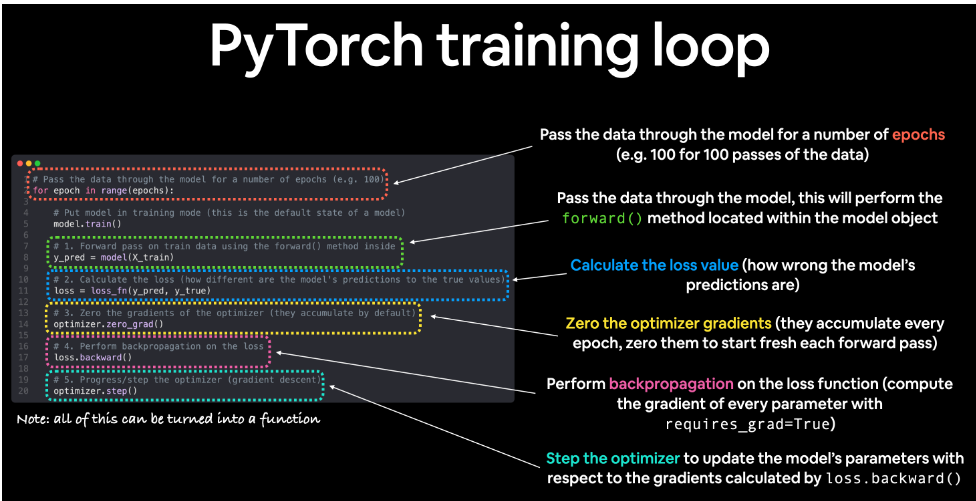
Now we can rewrite our training loop. The five manual steps are replaced by three elegant, high-level commands. This is the universal training loop pattern you will see in 99% of PyTorch code.
The Three-Line Mantra:
optimizer.zero_grad(): Replaces our manual.grad.zero_()for all parameters.loss.backward(): Same as before, calculates the gradients for all parameters.optimizer.step(): Replaces our manual weight update for all parameters using the logic of the chosen optimizer (e.g., Adam).
python# The professional training loop
epochs = 100
for epoch in range(epochs):
### FORWARD PASS ###
# Use the model to make a prediction
y_hat = model(X)
### CALCULATE LOSS ###
# Use our pre-built loss function
loss = loss_fn(y_hat, y_true)
### THE THREE-LINE MANTRA ###
# 1. Zero the gradients from the previous iteration
optimizer.zero_grad()
# 2. Compute gradients for this iteration
loss.backward()
# 3. Update the parameters
optimizer.step()
# Optional: Print progress
if epoch % 10 == 0:
# We can access the learned parameters through the model object
w_learned = model.linear_layer.weight.item()
b_learned = model.linear_layer.bias.item()
print(f"Epoch {epoch:02d}: Loss={loss.item():.4f}, W={w_learned:.3f}, b={b_learned:.3f}")
Output: (Starts from different random values but converges similarly)
plainEpoch 00: Loss=2.6515, W=-0.519, b=0.482 Epoch 10: Loss=1.7011, W=-0.219, b=0.582 Epoch 20: Loss=0.9706, W=0.117, b=0.678 Epoch 30: Loss=0.4805, W=0.456, b=0.767 Epoch 40: Loss=0.2078, W=0.768, b=0.846 Epoch 50: Loss=0.0886, W=1.031, b=0.912 Epoch 60: Loss=0.0435, W=1.238, b=0.963 Epoch 70: Loss=0.0270, W=1.391, b=1.000 Epoch 80: Loss=0.0221, W=1.499, b=1.025 Epoch 90: Loss=0.0210, W=1.571, b=1.042
We achieved the same result—a learning system that finds the underlying pattern in the data—but our code is now organized, scalable, and uses the standard, optimized tools provided by the PyTorch library.
We have completed the full journey from raw tensors to a professional PyTorch workflow. We understand not just what the code does, but why it's designed that way, because we built the "manual" version first.
The final step is to connect this simple model to the state-of-the-art giants. Let's move on to our conclusion, Part 10: The Big Picture - From Our Model to an LLM.
Part 10: The Big Picture - From Our Model to an LLM
We have come a long way. We started with a simple torch.Tensor, manually calculated gradients, and built a learning machine from scratch. Then, we refactored it using professional tools like nn.Module and torch.optim.
You might be thinking, "This is great for a toy linear regression model, but how does this relate to a massive, complex Large Language Model like GPT or Llama?"
The answer is simple: It's not an analogy. You have learned the exact, fundamental components and the universal process used to train them.
The difference between our model and an LLM is not one of kind, but one of scale and architecture.
10.1. The Direct Link: The Transformer's Feed-Forward Network
Every block in a Transformer (the architecture behind all modern LLMs) contains a sub-component called a Feed-Forward Network (FFN). Its job is to process the information refined by the attention mechanism.
What does this FFN look like? It's just a simple two-layer Multi-Layer Perceptron (MLP). You already have all the knowledge to build one. Here is the code for a standard FFN, written as an nn.Module, using only the bricks we learned in Part 8.
pythonimport torch.nn as nn
class FeedForwardNetwork(nn.Module):
def __init__(self, embedding_dim, ffn_dim):
super().__init__()
# In an LLM, embedding_dim might be 4096, ffn_dim might be 11000
# We use the LEGO bricks we already know:
self.layer1 = nn.Linear(embedding_dim, ffn_dim)
self.activation = nn.GELU()
self.layer2 = nn.Linear(ffn_dim, embedding_dim)
# We could add Dropout here as well
def forward(self, x):
# The data flow is exactly what you'd expect:
x = self.layer1(x)
x = self.activation(x)
x = self.layer2(x)
return x
# You can now read and understand this code perfectly.
# It's a direct application of what we learned in Parts 8 & 9.
The FFN inside a multi-billion parameter model is literally this simple. The model's complexity comes from stacking dozens of these Transformer blocks, each containing an FFN and a self-attention mechanism (which itself is also built from nn.Linear layers).
10.2. A Sense of Scale
The core operations are identical, but the size of the tensors is staggering. Let's compare the W matrix from our linear regression model to the weight matrix in just one FFN layer of an LLM.
| Parameter | Our Toy Model | A Typical LLM (e.g., Llama 3 8B) |
|---|---|---|
| Model | LinearRegressionModel | Transformer |
| Layer | nn.Linear | nn.Linear (inside an FFN) |
Weight Matrix W Shape | (1, 1) | (4096, 14336) |
| Matrix Multiplication | X @ W | X @ W |
| Total Parameters | 2 | ~8,000,000,000 |
The operation is the same: torch.matmul. The only difference is that one is a 1x1 dot product, and the other is a matrix multiplication involving hundreds of millions of values, which is why GPUs are essential.
10.3. The Universal Truth of Training
Most importantly, the process we used to train our 2-parameter model is the exact same process used to train a multi-billion parameter LLM. The five-step logic is universal.
Whether your model is our tiny LinearRegressionModel or a giant Transformer, the training loop is the same:
- Forward Pass:
y_hat = model(X)- For us: A single linear layer.
- For an LLM: Dozens of Transformer blocks, each with attention and FFNs.
- Calculate Loss:
loss = loss_fn(y_hat, y_true)- For us: Mean Squared Error.
- For an LLM: Cross-Entropy Loss (for predicting the next token).
- Zero Gradients:
optimizer.zero_grad()- Identical.
- Backward Pass:
loss.backward()- Identical. Autograd handles the complexity no matter how deep the model is.
- Update Parameters:
optimizer.step()- Identical. The optimizer doesn't care if it's managing 2 parameters or 8 billion.
Summary
- A model is just an
nn.Modulecontaining layers. - A layer is just a container for parameter tensors (
W,b) that performs a mathematical operation. - Learning is just the process of iteratively updating those parameters using gradients calculated by Autograd.
PYTORCH (UDEMY)
Pytorch Linear Regression model:-
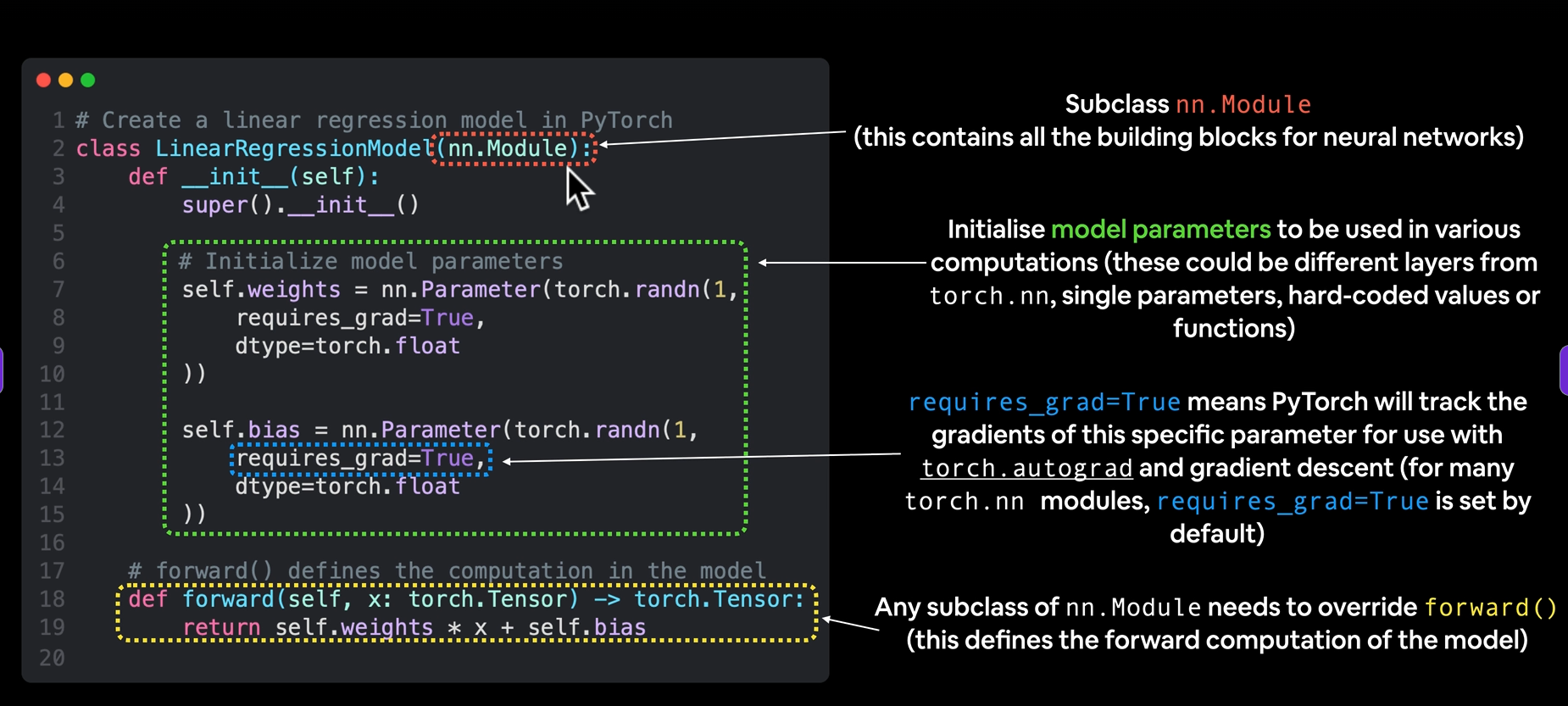
Pytorch model building essentials:-
| PyTorch module | What does it do? |
|---|---|
torch.nn | Contains all of the building blocks for computational graphs (essentially a series of computations executed in a particular way). |
torch.nn.Parameter | Stores tensors that can be used with nn.Module. If requires_grad=True gradients (used for updating model parameters via gradient descent) are calculated automatically, this is often referred to as "autograd". |
torch.nn.Module | The base class for all neural network modules, all the building blocks for neural networks are subclasses. If you're building a neural network in PyTorch, your models should subclass nn.Module. Requires a forward() method be implemented. |
torch.optim | Contains various optimization algorithms (these tell the model parameters stored in nn.Parameter how to best change to improve gradient descent and in turn reduce the loss). |
def forward() | All nn.Module subclasses require a forward() method, this defines the computation that will take place on the data passed to the particular nn.Module (e.g. the linear regression formula above). |
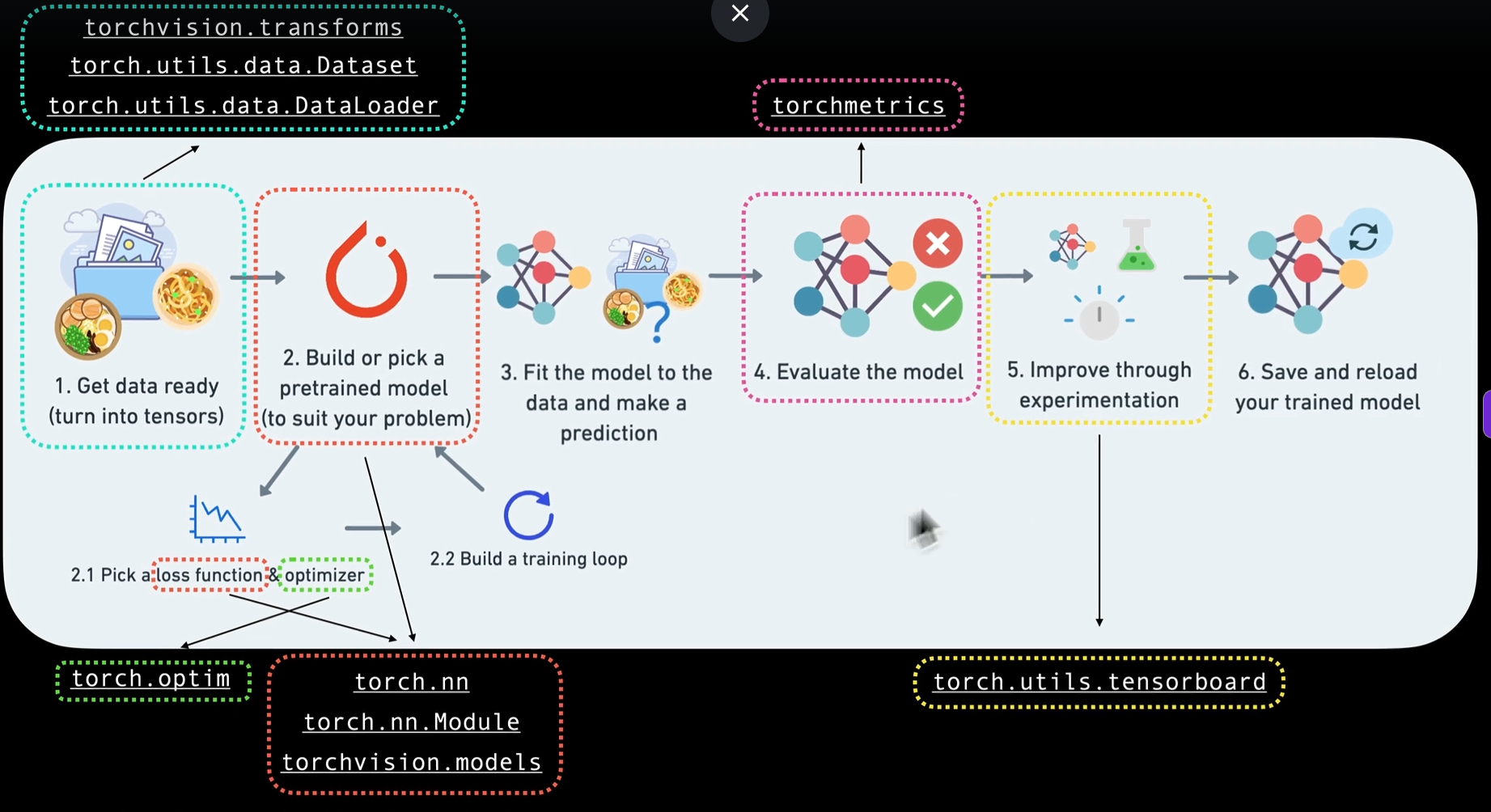
Making predictions using torch.inference_mode()
python# Make predictions with model
with torch.inference_mode():
y_preds = model_0(X_test)
# Note: in older PyTorch code you might also see torch.no_grad()
# with torch.no_grad():
# y_preds = model_0(X_test)
You probably noticed we used torch.inference_mode() as a context manager (that's what the with torch.inference_mode(): is) to make the predictions.
As the name suggests, torch.inference_mode() is used when using a model for inference (making predictions).
torch.inference_mode() turns off a bunch of things (like gradient tracking, which is necessary for training but not for inference) to make forward-passes (data going through the forward() method) faster.
Train Model:
The whole idea of training is for a model to from some unknown parameters (these may be random) to some known parameteres. Or in other words from a poor representation of the data to a better representation of the data.
One way to measure how poor or how wrong your models predictions are is to use a loss function. Note: Loss function may also be called cost function or criterion in different areas. For our case, we are going to refer to it as a loss function.
Things we need to train: → Loss function: A function to measure how wrong your model’s predictions are to the ideal outputs, lower is better. → Optimizer: Takes into account the loss of a model and adjusts the model’s parameters (eg. weight & bias in our case) to improve the loss function.
Depending on what kind of problem you're working on will depend on what loss function and what optimizer you use.
However, there are some common values, that are known to work well such as the SGD (stochastic gradient descent) or Adam optimizer. And the MAE (mean absolute error) loss function for regression problems (predicting a number) or binary cross entropy loss function for classification problems (predicting one thing or another).
For our problem, since we're predicting a number, let's use MAE (which is under torch.nn.L1Loss()) in PyTorch as our loss function.
Mean absolute error (MAE, in PyTorch: torch.nn.L1Loss__) measures the absolute difference between two points (predictions and labels) and then takes the mean across all examples.
And we'll use SGD, torch.optim.SGD(params, lr) where:
paramsis the target model parameters you'd like to optimize (e.g. theweightsandbiasvalues we randomly set before).lris the learning rate you'd like the optimizer to update the parameters at, higher means the optimizer will try larger updates (these can sometimes be too large and the optimizer will fail to work), lower means the optimizer will try smaller updates (these can sometimes be too small and the optimizer will take too long to find the ideal values). The learning rate is considered a hyperparameter (because it's set by a machine learning engineer). Common starting values for the learning rate are0.01,0.001,0.0001, however, these can also be adjusted over time (this is called learning rate scheduling).
python# Create the loss function
loss_fn = nn.L1Loss() # MAE loss is same as L1Loss
# Create the optimizer
optimizer = torch.optim.SGD(params=model_0.parameters(), # parameters of target model to optimize
lr=0.01) # learning rate (how much the optimizer should change parameters at each step, higher=more (less stable), lower=less (might take a long time))
Q: Which loss function and optimizer should i use?
Ans: This will be problem specific. But with experience, you will get an idea of what works and what does not with your particular problem set. For example, for a regression problem (like ours), a loss function of nn.L1Loss() and an optimizer like torch.optim.SGD() will suffice.
But for a classification problem like classifying whether a photo is of a dog or a cat, you will likely want to use a loss function of nn.BCELoss() (binary cross entropy loss).
And specifically for Pytorch, we need:
→ A training loop → A testing loop
Training Loop:
Testing:
modelname.eval() → you’re telling PyTorch that the model is no longer training, but instead will be used for testing or inference.
with torch.inference_mode(): = is a PyTorch context manager used to make inference faster and more memory-efficient.
pythonwith torch.inference_mode():
output = model(input)
It:
- Disables gradient calculation
- Disables autograd tracking
- Optimizes tensor operations for inference
- Prevents PyTorch from storing computation graphs.